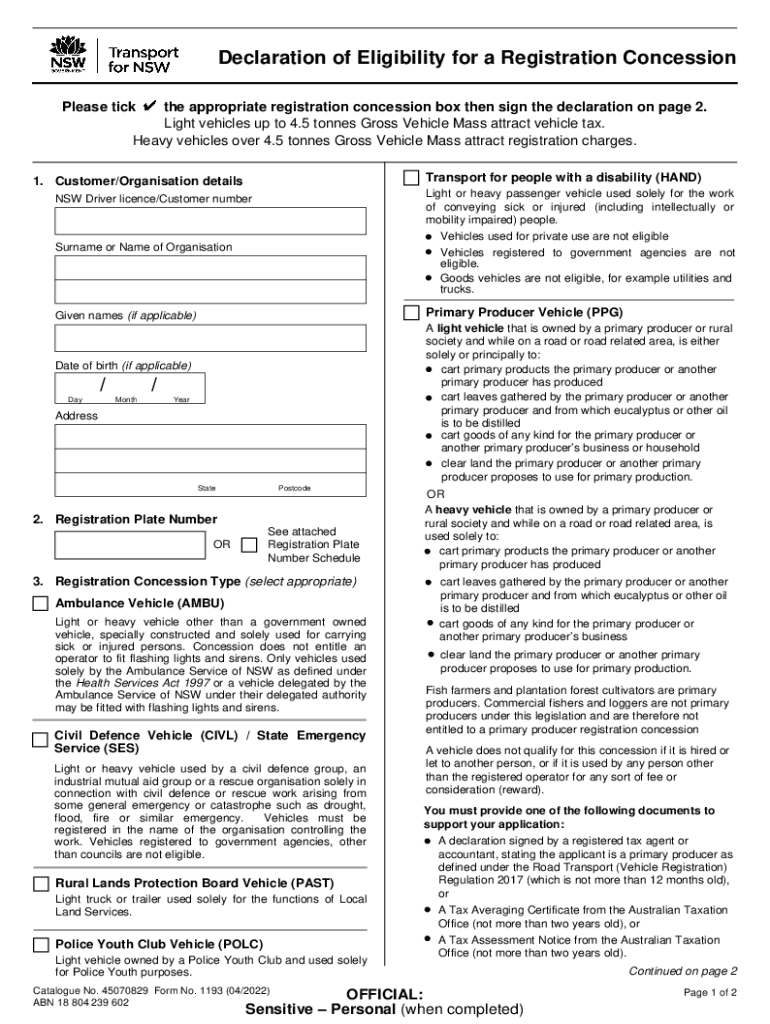
Ducer and from which eucalyptus or other oil is to be distilled cart goods of any kind for the primary producer or another primary producer s business clear land the primary producer or another primary producer proposes to use for primary production. Fish farmers and plantation forest cultivators are primary producers. Commercial fishers and loggers are not primary producers under this legislation and are therefore not entitled to a primary producer registration concession A vehicle does not q.
Loading

Open form follow the instructions

Easily sign the form with your finger

Send filled & signed form or save
How to fill out the AU NSW Form 1193 online
This guide provides users with a clear and supportive approach to completing the AU NSW Form 1193 online. Whether you are familiar with digital forms or new to the process, this guide will assist you in navigating each section effectively.
Follow the steps to successfully complete the form online.
- Click ‘Get Form’ button to access the AU NSW Form 1193. This action will open the form in your digital editor, where you can begin filling it out.
- In the first section, provide your customer or organisation details. This includes your surname or name of the organisation, given names (if applicable), date of birth (if applicable), and your address, including state and postcode.
- Next, specify your registration plate number or refer to the attached registration plate number schedule. This section is crucial for identifying the vehicle for which you are applying for a concession.
- Select the appropriate registration concession type by ticking the box next to options such as ambulance vehicle, civil defence vehicle, or any other categories listed. Ensure that the vehicle meets the criteria for the selected concession.
- In the customer or organisation declaration section, read through the declaration details and check the boxes indicating your understanding of eligibility and responsibilities.
- Finally, sign and date the declaration. This verifies your agreement with the information provided and your eligibility for the concession.
Get started with your digital documents today by completing the AU NSW Form 1193 online.
Experience a faster way to fill out and sign forms on the web. Access the most extensive library of templates available.
Use professional pre-built templates to fill in and sign documents online faster. Get access to thousands of forms.
If you believe that this page should be taken down, please follow our DMCA take down process here.