Loading
Get Widex Repair Form
How it works
-

Open form follow the instructions
-

Easily sign the form with your finger
-

Send filled & signed form or save
How to fill out the Widex Repair Form online
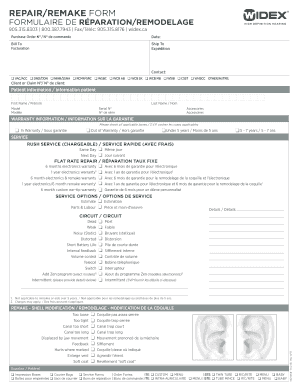
The Widex Repair Form is essential for initiating repairs or remakes of hearing aids. This guide offers a step-by-step approach to effectively complete the form online, ensuring a smooth and efficient process for users.
Follow the steps to accurately fill out the Widex Repair Form online.
- Press the ‘Get Form’ button to access the Widex Repair Form and open it in your preferred editing tool.
- Enter the purchase order number and the date at the top of the form to document your transaction.
- Fill in the 'Bill To' and 'Ship To' sections, providing accurate billing and shipping information for processing.
- Indicate your contact preferences by selecting relevant options such as VAC/ACC, DND/DDN, and others. This ensures the repair process is linked to the correct program.
- Provide the client or claim number if applicable, which helps in tracking the submission.
- Complete the patient information section by entering the first name and last name of the person needing repairs.
- Specify the model and serial number of the device needing repair, along with any accessories attached.
- Under warranty information, check all applicable boxes that describe the warranty status of the device.
- Choose the desired service options, including rush service if necessary, ensuring the urgency of the request is clearly communicated.
- Detail the specific issues with the device by checking appropriate boxes related to the circuit and supply issues.
- For any additional commentary regarding the condition or service needs, use the details field to provide succinct information.
- Review all filled information for accuracy before completing the form.
- Once confirmed, users can save any modifications, download, print the form, or share it accordingly.
Complete the Widex Repair Form online today for efficient processing of your repair needs.
If you're still having trouble connecting, try turning on and off Airplane Mode. Turn off Wi-Fi connections (temporarily) to minimize signal traffic to the device. Go to Settings > Accessibility > Hearing Devices or Settings > Bluetooth to forget the hearing aids and reconnect them.