Loading
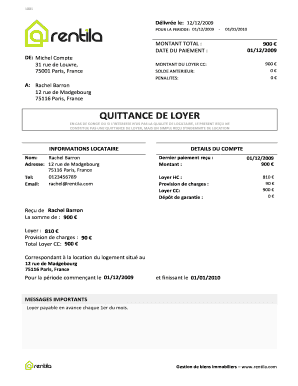
Get Quittance De Loyer - Brentilabbcomb
How it works
-

Open form follow the instructions
-

Easily sign the form with your finger
-

Send filled & signed form or save
How to fill out the QUITTANCE DE LOYER - Brentilabbcomb online
Filling out the QUITTANCE DE LOYER - Brentilabbcomb is essential for confirming rental payments. This guide will provide you with detailed instructions, ensuring you complete the form accurately and efficiently.
Follow the steps to fill out the QUITTANCE DE LOYER - Brentilabbcomb online.
- Click the ‘Get Form’ button to access the document and open it in your preferred editor.
- Begin by entering the tenant's name and address in the designated fields. For example, the name should read 'Rachel Barron,' with the address listed as '12 rue de Madgebourg, 75116 Paris, France.'
- Input the details of the rental payment. Enter the total amount paid and specify the date of payment. In this example, you would enter '900 €' for the amount and '01/12/2009' for the payment date.
- Include the amount of rent before charges (loyer HC) and the charges provision. For this case, it should be '810 €' for the rent and '90 €' for the provision of charges.
- Verify any prior balance and penalties, entering '0 €' for both, if there are no outstanding amounts.
- Review all information entered for accuracy, ensuring the start and end period of the rental is stated correctly, for instance, from '01/12/2009' to '01/01/2010.'
- Once all fields are completed and verified, save your changes. You can then download, print, or share the completed form as needed.
Complete your QUITTANCE DE LOYER - Brentilabbcomb online today and ensure your rental transactions are properly documented.