Loading
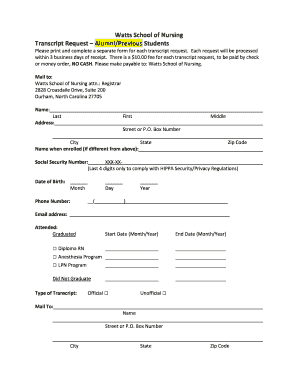
Get Nc Watts School Of Nursing Transcript Request Alumni/previous Students 2017-2026
How it works
-

Open form follow the instructions
-

Easily sign the form with your finger
-

Send filled & signed form or save
How to fill out the NC Watts School Of Nursing Transcript Request Alumni/Previous Students online
This guide provides a clear and supportive walkthrough for alumni and previous students looking to request their transcripts from the NC Watts School of Nursing. Follow these step-by-step instructions to ensure a smooth and efficient completion of the request form.
Follow the steps to successfully fill out your transcript request form.
- Click ‘Get Form’ button to access the transcript request form online.
- Begin by filling out your full name in the designated fields: first name, middle name, and last name. This ensures accurate identification.
- If your name differs from your enrolled name, please specify the name you used during enrollment to help verify your records.
- Input your phone number where you can be reached for any follow-up questions.
- Include your email address for electronic correspondence regarding your transcript request.
- Indicate the time period of your attendance by filling in the start and end dates, including month and year. Select your program from the options provided: Diploma RN, Anesthesia Program, LPN Program, or indicate if you did not graduate.
- Select the type of transcript you require: Official or Unofficial.
- Provide the mailing information for where you would like the transcript sent, including name, street address or P.O. Box, city, state, and zip code.
- After completing the form, review all entries for accuracy to avoid delays in processing.
Complete your transcript request form online today to receive your documents without delay.
Email registrar@duke.edu if you have questions about interpreting a transcript.