Loading

Open form follow the instructions

Easily sign the form with your finger

Send filled & signed form or save
How to fill out the PH Municipal Form 102 online
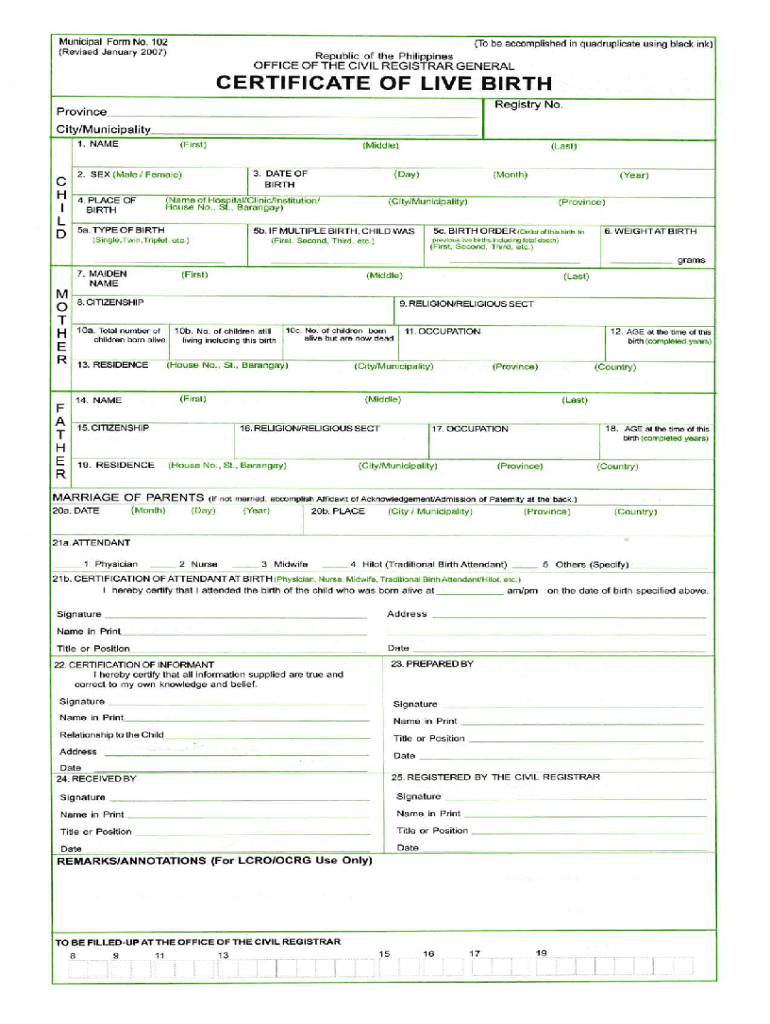
Filling out the PH Municipal Form 102 online can streamline your document management process. This guide provides clear, step-by-step instructions to help you complete the form accurately and efficiently.
Follow the steps to successfully complete your PH Municipal Form 102 online
- Click ‘Get Form’ button to obtain the form and open it in the editor.
- Carefully review the form before starting to ensure you understand each section and its requirements.
- Proceed to complete any relevant sections regarding your residency status or property details, as applicable to your situation.
- Review your inputs for accuracy before proceeding to the next sections. This step is critical to avoid errors that may delay processing.
- Once the form is complete, you can save your changes, download it for your records, print a hard copy, or share it as needed.
Start completing your PH Municipal Form 102 online today for a hassle-free experience.
Experience a faster way to fill out and sign forms on the web. Access the most extensive library of templates available.
Related content
Form 3701—General Information. (Registration of Claim for Use of Deceased Individual's...
A conscientious exemption form from the Texas Department of State Health Services must be...
For purposes of this Act 167 Plan, road maintenance activities are regulated under 25 Pa...
Get answers to your most pressing questions about US Legal Forms API.
How do I get a local copy of my birth certificate?
PROCESS: Fill out the Certificate of Live Birth form and submit it to the City Civil Registry Department together with other requirements. The receiving clerk will check if the requirements are complete and will assign a registry number to the client. Finally, the clerk will release the document to the registrant.
How to get Form 102 birth certificate?
You can get a Certified True Copy of Certificate of Live Birth (COLB) at the Local Civil Registrar's office of the city of municipality where you were born. Proceed to the LCR office and provide your: Complete and registered name. Birth date and birthplace.
How to get PSA birth certificate online?
Follow the three easy steps below for your PSA online application. 1 Request for a certificate online. 2 Pay online or over-the-counter. 3 Wait for the delivery.
How much is PSA birth certificate?
PSA Serbilis accepts requests for delivery within and outside the Philippines. LOCAL REQUEST: delivery destination is within the Philippines; PHP 330.00 per copy for copy issuance of birth, marriage and death certificates, and PHP 430.00 per copy for Certificate of No Marriage Record (CENOMAR).
How much is PSA birth certificate in Philippines?
How much does a PSA Birth Certificate cost? It costs P365 for Birth, Marriage, or Death Certificates. For CENOMAR, it costs P420. The rates are inclusive of the service fee and nationwide courier fees.
How fast can I get PSA birth certificate?
For delivery destinations within the Philippines: For delivery destinations within Metro Manila, processing and delivery of paid requests take around four (4) to six (6) working days after receipt of payment; additional 5 to 7 days for areas that are outside of courier's standard serviceable areas.
How can I get Philippine birth certificate from abroad?
Go to the nearest SM Business Centers, get a payment form and line to pay the fee. Bring your Valid ID. Authorization Letter and Photocopy of owner's ID (if you are not the owner, parent, spouse, direct descendants or legal guardian)
How do I get a new PSA birth certificate?
You can get a Certified True Copy of Certificate of Live Birth (COLB) at the Local Civil Registrar's office of the city of municipality where you were born. Proceed to the LCR office and provide your: Complete and registered name. Birth date and birthplace.
Use professional pre-built templates to fill in and sign documents online faster. Get access to thousands of forms.
If you believe that this page should be taken down, please follow our DMCA take down process here.