Loading
Get Ca Dfeh-e11p-eng 2019-2026
How it works
-

Open form follow the instructions
-

Easily sign the form with your finger
-

Send filled & signed form or save
How to fill out the CA DFEH-E11P-ENG online
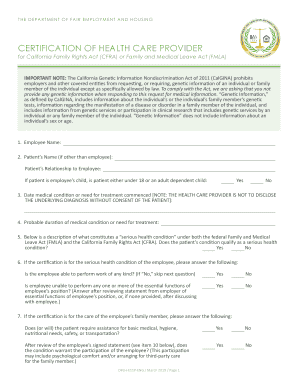
Filling out the CA DFEH-E11P-ENG form is an essential step in requesting medical leave under the California Family Rights Act (CFRA) or Family and Medical Leave Act (FMLA). This guide provides clear, step-by-step instructions to help you complete the form accurately and efficiently.
Follow the steps to successfully complete the CA DFEH-E11P-ENG form.
- Click the ‘Get Form’ button to access the CA DFEH-E11P-ENG form and open it in the online editor.
- Begin by filling in the employee's name in the designated field. Ensure that the name matches official records to avoid any delays.
- If the patient is different from the employee, enter the patient's name in the corresponding field. Then, specify the relationship of the patient to the employee.
- Indicate if the patient is the employee's child and whether they are under 18 or an adult dependent child by selecting 'Yes' or 'No'.
- Provide the date on which the medical condition or need for treatment commenced. Remember, the health care provider should not disclose the underlying diagnosis without the patient's consent.
- Estimate the probable duration of the medical condition or the need for treatment, which will help determine eligibility for leave.
- Assess whether the patient's condition qualifies as a serious health condition by selecting 'Yes' or 'No', referring to the provided definition if needed.
- If the certification concerns the employee's serious health condition, answer the relevant questions regarding their ability to perform work, proceeding to the next section only if necessary.
- Complete the questions regarding the care required by the employee's family member, including whether they will need assistance for basic needs.
- For intermittent leave or reduced work schedule requests, indicate the medical necessity and provide specifics on how often these leaves will occur and their expected duration.
- Fill in the section designated for the employee needing family leave. Clearly state the care to be provided and the estimated time period required.
- Once all sections are carefully completed, enter the printed name and signature of the health care provider, as well as the employee’s signature, and date the document.
- After thorough review, save any changes made to the form. You may also choose to download, print, or share the completed form as needed.
Start filling out your CA DFEH-E11P-ENG form online today to ensure your leave request is processed smoothly.