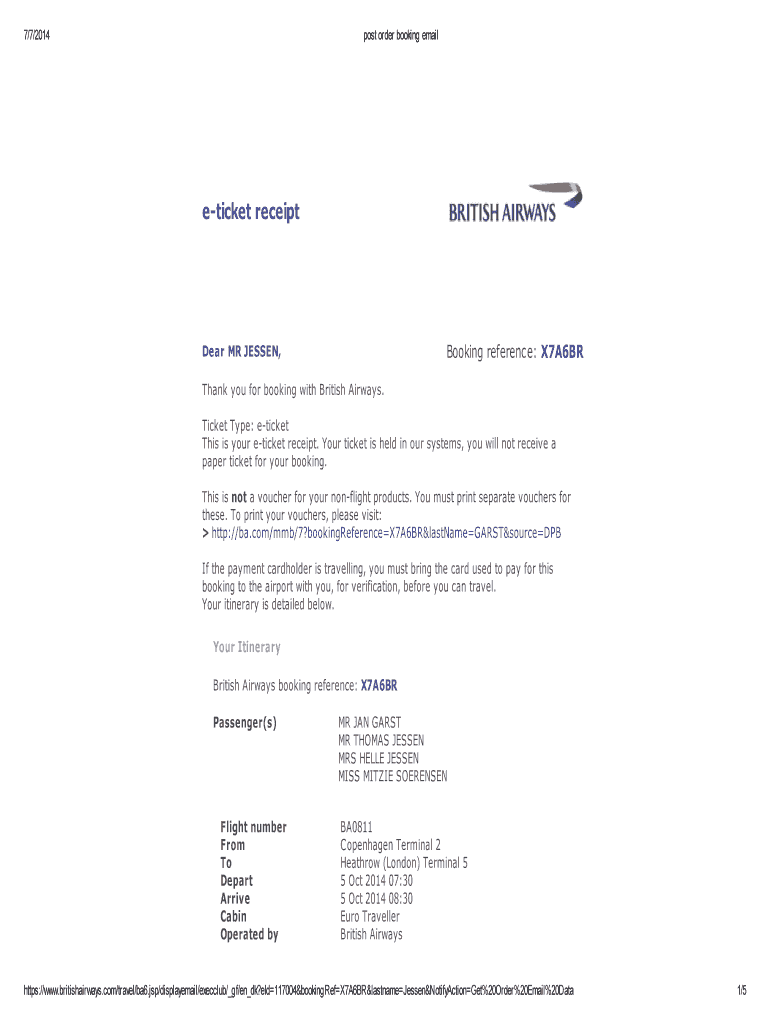
7/7/2014post order booking emaileticket receiptBooking reference: X7A6BRDear MR JESSE, Thank you for booking with British Airways. Ticket Type: ticket This is your ticket receipt. Your ticket is held.

Open form follow the instructions

Easily sign the form with your finger

Send filled & signed form or save
How to fill out the British Airways receipt online
Filling out the British Airways receipt online is a straightforward process that ensures you have the necessary documentation for your travel. This guide provides detailed, step-by-step instructions to assist you in properly completing the form.
Follow the steps to complete the British Airways receipt online:
- Click ‘Get Form’ button to retrieve the British Airways receipt and open it in the editor.
- Locate the booking reference field. Enter your unique booking reference, found in your email confirmation.
- Fill in the ticket type section. Ensure that it correctly reflects 'e-ticket' as indicated on your confirmation.
- Complete the passenger information section. List all the individuals traveling under this booking, ensuring to enter their names as shown on their travel documents.
- Input the relevant flight information. This includes flight numbers, departure and arrival locations, and times. Double-check this information against your confirmation email.
- Fill in the payment information section. Enter the details related to the payment card used, including card type, cardholder name, billing address, and payment total.
- Review all sections for accuracy ensuring no information is missing or incorrect.
- Once all information is filled out correctly, save your changes. You may also choose to download, print, or share the completed receipt.
Complete your British Airways receipt online now for a smooth travel experience.
Experience a faster way to fill out and sign forms on the web. Access the most extensive library of templates available.
Related content
The net proceeds of sale shall be received by the Company (whose receipt shall be a good...
The receipt has portions of the flight that are. U.S. Flag Air Carriers and portions that...
WARRANTY IS ONLY VALID WITH A DATED PROOF OF PURCHASE. To guarantee repair or replacement...
Get answers to your most pressing questions about US Legal Forms API.
Do I need to print my flight receipt?
Do I have to print out an electronic ticket for a flight? There is no need to print out the itinerary receipt. When checking in at the airport, it is enough to show your passport. But in some cases, airlines or airport staff ask to see a paper or electronic copy of the ticket.
What is an e-ticket for British Airways?
an eticket means your ticket lives in the computer and you dont actually have a ticket as such. All you need is some ID, though sometimes USA immigration will want to see your "ticket" in which case the printed itinerary that many call an eticket will do, but its not actually a ticket, there is no such thing any more.
How do I get a PDF of my British Airways ticket?
Once in your booking please firstly check that we have the correct email address for you, within the "Contact details" section. Then, if you scroll further down the page (towards the bottom) you'll see the option "Print/email e-ticket receipt" within the "Administration" section.
When can I print my BA tickets?
Check in from 24 hours before your flight departs at Manage My Booking. Print, download or email your boarding pass. If you lose or forget your boarding pass, you can print it again at a check-in kiosk at the airport.
Does British Airways issue e tickets?
You will get an e-ticket when you book through a travel agent or on ba.com. Click here to close this guide and book a flight directly from the ba.com homepage.
How do I get a payment receipt from British Airways?
Did you not get a fare breakdown on your e-ticket? Go to ba.com and 'Manage My Booking'. Click 'Print/email e-ticket receipt', enter the number of the payment card (for security purposes) and you will see a full breakdown of the fare and all fees, charges and taxes.
Where to upload COVID documents British Airways?
Please log in to Manage My Booking from 48 hours before departure and upload all travel documents required for your journey. We'll then review your documents to make sure you're ready to travel.
Use professional pre-built templates to fill in and sign documents online faster. Get access to thousands of forms.
If you believe that this page should be taken down, please follow our DMCA take down process here.