Loading
Get The Surat People's Co-op Bank Ltd
How it works
-

Open form follow the instructions
-

Easily sign the form with your finger
-

Send filled & signed form or save
How to fill out The Surat People's Co-op Bank Ltd online
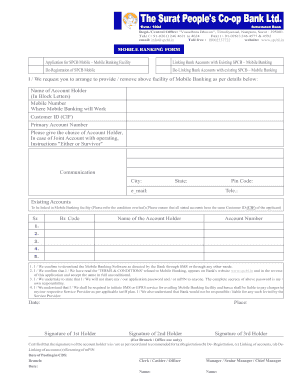
This guide provides step-by-step instructions for users to fill out The Surat People's Co-op Bank Ltd Mobile Banking Form online. Our clear guidance aims to assist users, regardless of their previous experience with online document management.
Follow the steps to successfully complete the online form.
- Click the ‘Get Form’ button to obtain the form and open it in your editor.
- Begin by filling in your personal details, such as the name of the account holder in block letters, mobile number, customer ID (CIF), and primary account number. These fields are essential for identifying your bank account.
- If applicable, choose the appropriate communication city, state, and pin code to ensure that the bank can contact you regarding your mobile banking service.
- Indicate your email address and telephone number, ensuring the bank has multiple ways to reach you.
- In the 'Existing Accounts' section, list the accounts you wish to link to the mobile banking facility. Ensure that each account listed has the same customer ID (CIF) as the primary account.
- Read and confirm the conditions stated regarding downloading the mobile banking software, ensuring you understand your responsibilities in securing your application password and mPIN.
- Sign the form where indicated, providing signatures for all account holders as needed. If you have joint accounts, ensure all holders sign accordingly.
- Finally, after reviewing your information for accuracy, proceed to save changes, and download, print, or share the completed form as necessary.
Complete your mobile banking documents online today for a streamlined banking experience.
We are The Co-operative Bank Founded in 1872, we were born from the co-operative movement, and co-operative values continue to be a fundamental part of everything we do.