Loading
Get Online Visa Apply For India
How it works
-

Open form follow the instructions
-

Easily sign the form with your finger
-

Send filled & signed form or save
How to fill out the Online Visa Apply For India online
Applying for an Indian visa online can be a straightforward process if you understand the necessary steps and requirements. This guide provides detailed instructions on how to complete the Online Visa Apply For India, ensuring that you fill out the form correctly and efficiently.
Follow the steps to complete your visa application accurately
- Click ‘Get Form’ button to obtain the form and open it for completion.
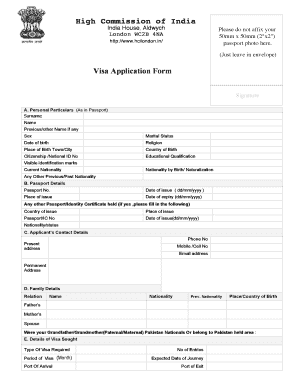
- Begin with section A, which addresses your personal particulars. Fill in your surname, name, any previous names, gender, marital status, date of birth, religion, place of birth, country of birth, citizenship or national ID number, educational qualifications, any visible identification marks, current nationality, nationality by birth or naturalization, and any other previous nationalities you may have had.
- Proceed to section B for passport details. Provide your passport number, date of issue in dd/mm/yyyy format, place of issue, date of expiry in dd/mm/yyyy format, and information about any other passports or identity certificates held, including the country of issue, place of issue, passport number, date of issue, and nationality or status.
- In section C, provide your contact details. Include your phone number, current address, mobile number, email address, and permanent address.
- Section D requires you to provide family details. List the relation, name, nationality, previous nationality, and place/country of birth for your father, mother, and spouse. Additionally, answer whether your grandparents were Pakistan nationals or belonged to a Pakistan-held area.
- In section E, specify the details of the visa you are seeking. Indicate the type of visa required, the period of the visa in months, port of arrival, number of entries, expected date of journey, and port of exit. Also, provide details about the purpose of your visit.
- Section F asks about previous visits to India. Indicate if you have ever visited India, provide the address where you stayed, cities visited, type of visa issued, visa number, date of issue, and declare if you have ever been refused a visa or deported from India, including details if applicable.
- In section G, describe your profession or occupation. Include your present occupation, designation, employer name and address, phone number, past occupation, and whether you have worked with armed forces, police, or paramilitary forces along with the organization and place of posting.
- Section H requires you to provide details about your place of stay or hotel during your visit. Include the hotel name and address.
- Provide references in section I. Use the designated fields to fill in details for two references in India, including their names, addresses, designations, ranks, and contact numbers.
- In the declaration, read through the statements carefully, confirming accuracy of the information provided and understanding the conditions of the visa application. Sign and date where required.
- At the final step, review all entries for completeness and accuracy. Save changes, download the completed form, and consider printing or sharing it for your records.
Complete your online visa application now to begin your journey to India.
Travelers from the United States of America can apply online to obtain an electronic visa. US nationals who hold an e-Visa are authorized to travel to and enter India. The US is on the list of over 170 countries whose citizens can get an India e-Visa for tourism, business, or medical treatment.