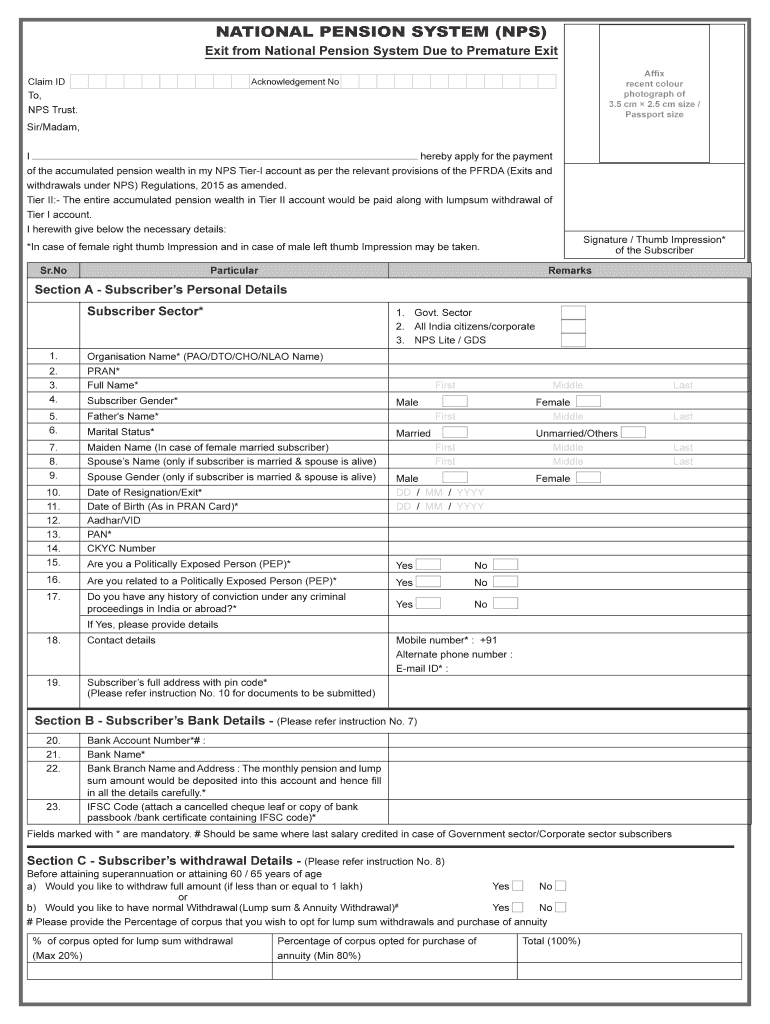
NATIONAL PENSION SYSTEM (NPS) Exit from National Pension System Due to Premature Exit Claim Affix recent color photograph of 3.5 cm 2.5 cm size / Passport sizeAcknowledgement Not, NPS Trust. Sir/Madam,.
Loading

Open form follow the instructions

Easily sign the form with your finger

Send filled & signed form or save
How to use or fill out the Nps Exit Form Filled Sample online
This guide provides a comprehensive overview of the steps required to complete the Nps Exit Form Filled Sample online, ensuring a smooth and accurate submission process for users seeking to withdraw their pension wealth from the National Pension System (NPS). Follow these instructions carefully to ensure all necessary details are completed correctly.
Follow the steps to successfully complete the Nps Exit Form online.
- Click 'Get Form' button to access the Nps Exit Form. This will allow you to open the required form in your preferred online editor.
- Begin filling out Section A, which contains Subscriber’s Personal Details. Provide mandatory information such as your full name, date of birth, and the PRAN (Permanent Retirement Account Number). Ensure you follow the specified formats for dates and names.
- In the same section, include details regarding your organization and personal identifiers like Aadhaar number and PAN. Be accurate, as errors in these fields can delay processing.
- Proceed to fill out Section B, which focuses on Bank Details. Make sure to provide a correct Bank Account Number, Bank Name, and IFSC Code to ensure a seamless transaction for your funds.
- Then, navigate to Section C where you will specify your withdrawal preferences. Indicate whether you want a complete or normal withdrawal and provide details regarding the distribution of funds between lump sums and annuity purchases.
- If you are selecting annuity options in Section D, choose your preferred Annuity Service Provider and the type of annuity scheme you wish to opt for. Make sure to review each option carefully before deciding.
- Next, complete Section E regarding Nomination Details. Nominees must be immediate family members; provide their names, relationships, and details as required.
- After all sections are completed, review your filled form for any inaccuracies. Make sure all mandatory fields marked with an asterisk are filled out.
- Finally, once you have verified the information, you can save the changes, download the completed form for your records, print it out if necessary, or share it as instructed in the guidelines.
Complete your Nps Exit Form online today to ensure a smooth withdrawal process.
Experience a faster way to fill out and sign forms on the web. Access the most extensive library of templates available.
Related content
Browse and download your choice of form(s) issued by the Office of Personnel Management...
Procedure. Fill syringe with desired medication. Attach Mucosal Atomizer Device to tip of...
The document provides guidance in the form of usable templates and examples. For the...
Get answers to your most pressing questions about US Legal Forms API.
Can I withdraw 100% from NPS?
No, it is not possible to withdraw 100% of the accumulated corpus from the National Pension System (NPS) at once. The NPS is a retirement-focused investment product, which means that the money you invest in it is meant to provide you with a regular income after you retire.
Can I withdraw entire amount from NPS Tier 2?
In order to withdraw from Tier II account, the subscriber needs to submit a duly filled UOS-S12 to the associated POP-SP. On T+3 days, (T being the date of processing) the funds shall be transferred from the Trustee Bank to subscriber's bank account as registered in the CRA system.
What is the withdrawal limit in NPS?
NPS WithdrawalEPF WithdrawalAfter serving at least 25 years of service, then they can withdraw up to 50% of their contribution to NPSOne year before retirement, you can withdraw up to 90% of the corpus, if you have attained the age of 57 years4 more rows
What happens if I exit my NPS account?
In case of exit before completion of 3 years, the Subscriber will have to utilize at-least 80% of the corpus for purchase of annuity and the remaining corpus can be withdrawn in lump sum. Complete (100%) withdrawal allowed as lump sum if the corpus is less than or equal to ₹ 2.5 Lakh.
What documents required for withdrawal of NPS?
Following documents are required to be submitted alongwith the duly filled Withdrawal form for Superannuation & Pre-mature Exit: Original PRAN card. Advanced stamped receipt, to be duly filled and cross-signed on the Revenue stamp by the Subscriber. KYC documents (address and photo-id proof)
How can I withdraw my full NPS amount?
The online withdrawal process can be initiated in either of the two ways: By subscriber using User ID & IPIN: The subscriber can directly initiate withdrawal application using his/her User ID & IPIN in the CRA system with in a period of 6 months before the age of superannuation/vesting date opted by subscriber.
How many times I can withdraw from NPS?
A subscriber can make partial withdrawal after joining the NPS after 10 years, not exceeding twenty-five per cent of the contributions made by him/her and excluding contribution made by employer, if any, at any time before exit from National Pension System subject to the terms and conditions, purpose, frequency and ...
What are the rules for NPS exit and withdrawal?
Normal exit Complete (100%) Lump sum withdrawal is allowed if the corpus is less than or equal to ₹ 5 Lakh. If the corpus is more than ₹ 5 Lakh, at least 40% of the accumulated pension wealth of the Subscriber has to be utilized for purchase of an Annuity and the balance 60% is paid as lump sum.
Use professional pre-built templates to fill in and sign documents online faster. Get access to thousands of forms.
If you believe that this page should be taken down, please follow our DMCA take down process here.