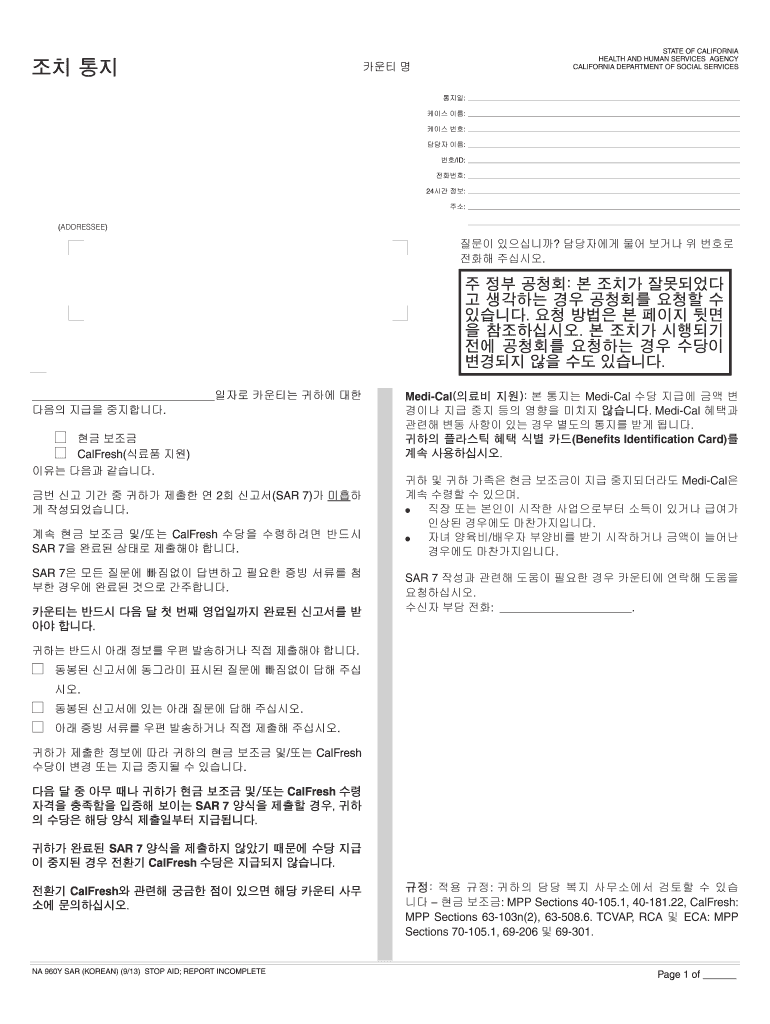
STATE OF CALIFORNIA HEALTH AND HUMAN SERVICES AGENCY CALIFORNIA DEPARTMENT OF SOCIAL SERVICES : : : : /ID: : 24 : : (ADDRESSEE) ? . : .
Loading

Open form follow the instructions

Easily sign the form with your finger

Send filled & signed form or save
How to fill out the CA NA 960Y SAR online
The CA NA 960Y SAR is an essential form used for reporting your status to continue receiving benefits. This guide provides a clear, step-by-step approach to help you complete the form online, ensuring that your information is accurately reported for continued support.
Follow the steps to fill out the CA NA 960Y SAR online
- Press the ‘Get Form’ button to access the form and open it in the editor.
- Begin by filling in the county name and the date of the notice at the top of the form.
- Provide your case name and case number in the designated fields. These details are critical for your application.
- Enter the contact person's name, ID number, and phone number in the specified sections to ensure proper communication.
- Respond to all questions outlined in the form. Ensure every required field has been completed to avoid delays in processing.
- Attach any necessary supporting documents that may be requested for verification.
- Review your completed form to ensure all information is accurate and complete before submission.
- Save your changes, download, and/or print a copy of the form for your records.
- Share the completed form with your county office by mailing or delivering it in person.
Complete your CA NA 960Y SAR form online to maintain your benefits.
Experience a faster way to fill out and sign forms on the web. Access the most extensive library of templates available.
Related content
Se a audiência for solicitada antes de uma ação do Cash Aid,. Medi-Cal, CalFresh ou...
de la frontera entre Estados Unidos y México, incluyendo a músicos, miembros de ìa...
Get answers to your most pressing questions about US Legal Forms API.
How long does it take for CalFresh to process SAR 7?
CalFresh typically processes SAR 7 submissions within 30 days. While some cases may be approved faster, others may take more time due to various factors. Keeping your information updated helps speed up the process. Should you encounter issues, uslegalforms can be a valuable resource for tracking your submission and understanding potential delays.
Can you do SAR 7 over the phone?
CalFresh does not accept SAR 7 submissions over the phone; it requires written documentation. You can, however, call your local office for guidance on completing the form. They can help clarify any questions you have about the process as you fill it out. If you prefer assistance, consider using resources from uslegalforms to simplify your experience.
What happens if I don't fill out SAR7?
Not filling out your SAR 7 can lead to loss of your CalFresh benefits. The SAR 7 is a critical component in determining your eligibility, so it is essential to submit it on time. If you miss the deadline, you may need to reapply for assistance, which can be time-consuming. Engaging with platforms like uslegalforms can help ensure you never miss these important deadlines.
How long does it take for my SAR 7 to be approved?
Typically, it takes about 30 days for your SAR 7 to be processed and approved by CalFresh. The duration may vary depending on your county and their current processing volume. It is important to keep track of your submission date and any follow-ups. If delays occur, uslegalforms can provide support in navigating your submission status.
What happens if I forgot to report income to CalFresh?
If you forget to report income on your SAR 7, it may lead to a reduction or suspension of your CalFresh benefits. It is important to correct any omissions as soon as possible to avoid potential penalties. Your reporting accuracy is crucial for maintaining the right amount of aid. For assistance with the SAR 7 process, consider using resources from uslegalforms for guidance.
Can SAR7 be completed online?
Yes, the SAR 7 form can be completed online through the CalFresh website. This convenient option allows you to fill out and submit your form easily from your device. Using the online method helps save time and ensures that your information is processed quickly. If you need assistance, platforms like uslegalforms offer tools to guide you through the process.
What is the SAR 7 form for CalFresh?
The SAR 7, or the CA NA 960Y SAR, is a form that CalFresh recipients use to report changes in their circumstances, such as income or household size. This form helps to ensure that your benefits remain accurate and reflect your current situation. Submitting the SAR 7 on time is crucial to avoid disruptions in your assistance. Remember, regular updates can significantly help in maintaining your eligibility.
What happens if I don't fill out SAR 7?
Failing to fill out the SAR 7 form can lead to a suspension or termination of your CalFresh benefits. It is essential to adhere to deadlines and requirements to maintain uninterrupted access to your benefits. By promptly submitting your CA NA 960Y SAR, you can ensure that you continue to receive the support you rely on.
What is the SAR cycle for CalFresh?
The SAR cycle for CalFresh dictates how often recipients need to submit their SAR 7 form for review. In most cases, this cycle happens every six months, ensuring that your benefits align with your current situation. Keeping track of your CA NA 960Y SAR cycle will help you avoid interruptions in assistance.
Can SAR 7 be completed online?
Yes, many counties allow the SAR 7 form to be completed online, making the process more convenient for you. You can often submit your CA NA 960Y SAR electronically, which helps to streamline everything and reduce paperwork. Check your local office's website for specific instructions and ensure you have all necessary information ready.
Use professional pre-built templates to fill in and sign documents online faster. Get access to thousands of forms.
If you believe that this page should be taken down, please follow our DMCA take down process here.