Loading
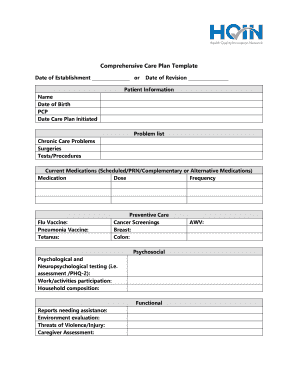
Get Printable Chronic Care Management Documentation Template
How it works
-

Open form follow the instructions
-

Easily sign the form with your finger
-

Send filled & signed form or save
How to fill out the Printable Chronic Care Management Documentation Template online
The Printable Chronic Care Management Documentation Template serves as a key tool for healthcare providers in managing chronic care effectively. This guide provides clear, step-by-step instructions on how to complete the template online, ensuring that all patient information and care management details are accurately captured.
Follow the steps to complete the template with ease.
- Click the 'Get Form' button to access the form and open it in your preferred digital editor.
- Begin with the 'Date of Establishment' and 'Date of Revision' fields. Fill these in with the appropriate dates as they pertain to the patient's care plan.
- In the 'Patient Information' section, enter the patient's name, date of birth, primary care provider (PCP), and the date the care plan was initiated.
- Populate the 'Problem List' with the chronic care problems relevant to the patient, along with any past surgeries and tests or procedures that have been performed.
- List 'Current Medications' including scheduled, as needed (PRN), and complementary or alternative medications. For each medication, provide the name, dose, and frequency of administration.
- Complete the 'Flu Vaccine', 'Pneumonia Vaccine', and 'Tetanus' sections by indicating the status of each vaccination.
- Fill out the 'Preventive Care' section by listing relevant cancer screenings.
- Address the 'Psychosocial' components by documenting psychological assessments and work or activities participation, followed by household composition.
- Evaluate functional status by reporting on any necessary assistance, environmental evaluations, and any threats of violence or injury.
- Include the 'Chronic Condition #1' details, such as goals, interventions, prognosis, and the action plan for treatment goals and coordination of care. Repeat for 'Chronic Condition #2'.
- Indicate whether the care plan has been reviewed and shared with the patient by checking the appropriate boxes.
- Outline any care management follow-up activities, specifying a description of each task and the time spent on it in minutes.
- Finally, save your changes and choose to download, print, or share the completed form as needed.
Get started now and complete your documents online for effective chronic care management.
Requirements: Two or more chronic conditions expected to last at least 12 months (or until the death of the patient) Patient consent (verbal or signed) Personalized care plan in a certified EHR and a copy provided to patient.