Loading
Get Ca Movers Choice Agreement To Add Carrier 2019-2026
How it works
-

Open form follow the instructions
-

Easily sign the form with your finger
-

Send filled & signed form or save
How to fill out the CA Movers Choice Agreement To Add Carrier online
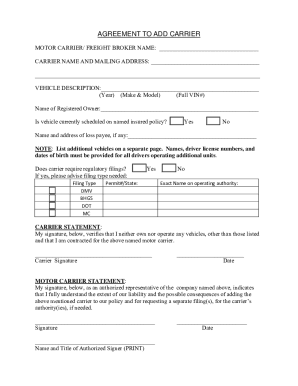
This guide will assist you in completing the CA Movers Choice Agreement To Add Carrier online. By following the steps outlined below, you will be able to fill out the necessary information accurately and efficiently.
Follow the steps to complete the form with ease.
- Click ‘Get Form’ button to access the document and view it in your preferred online editor.
- In the field labeled 'Motor Carrier/Freight Broker Name,' enter the official name of the motor carrier or freight broker you are adding.
- Provide the 'Carrier Name and Mailing Address' in the appropriate fields, ensuring accuracy in both name and address information.
- Fill out the 'Vehicle Description' section, which includes the year, make, model, and full VIN (Vehicle Identification Number) of the vehicle.
- In the 'Name of Registered Owner' field, enter the name of the person or entity that legally owns the vehicle.
- Indicate if the vehicle is currently scheduled on the named insured policy by checking 'Yes' or 'No.'
- If applicable, provide the 'Name and Address of Loss Payee,' if there is one associated with the vehicle.
- Choose whether the carrier requires regulatory filings by checking 'Yes' or 'No.' If 'Yes,' specify the filing types needed from the available options.
- If regulatory filings are required, complete the additional fields for the specific filing type and permit number/state if needed.
- Both the carrier and the authorized representative from the motor carrier must provide signatures, along with the printed name, title, and date to validate the form.
- Once all mandatory fields are completed, review the document for accuracy. Save your changes, and choose to download, print, or share the form based on your needs.
Complete your documents online effortlessly by following these steps.