Loading
Get Canada Imm 5782 E 2021-2026
How it works
-

Open form follow the instructions
-

Easily sign the form with your finger
-

Send filled & signed form or save
How to fill out the Canada IMM 5782 E online
This guide provides a comprehensive overview of how to effectively complete the Canada IMM 5782 E form online. Whether you are renouncing your permanent resident status or assisting someone else, these step-by-step instructions will help ensure accuracy and clarity in your application.
Follow the steps to fill out the Canada IMM 5782 E form online.
- Click ‘Get Form’ button to obtain the form and open it in the online editor.
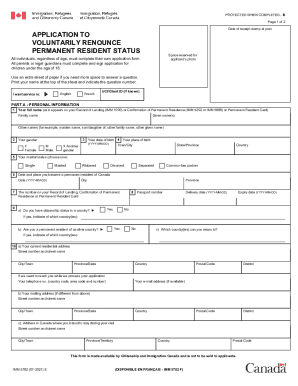
- In Part A, enter your personal information. Begin by inputting your full name as it appears on your Record of Landing, Confirmation of Permanent Residence, or Permanent Resident Card. Include your family name and given names. If applicable, provide any other names you may have, such as a maiden name.
- Indicate your gender by selecting the appropriate option: Female, Male, or Another gender. Fill in your date of birth using the format YYYY-MM-DD.
- Provide the details of your marital status by choosing from options like Single, Married, Widowed, Divorced, Separated, or Common-law partner.
- Enter your place of birth (town/city, state/province, and country). Additionally, record the date and location you became a permanent resident of Canada.
- If you hold citizenship status in any country, answer 'Yes' and provide the respective passport number along with its delivery and expiry dates. If you are a permanent resident of another country, state that as well, or respond 'No.'
- List the country or countries to which you can return if applicable.
- Fill in your current residential address including your street number, street name, city/town, province/state, country, and postal code.
- If your mailing address differs from your residential address, provide that information as well.
- Complete the address where you intend to stay during your visit, if necessary.
- In Part B, review the declaration statement. By signing, you confirm your intention to voluntarily renounce your permanent resident status and acknowledge the implications of doing so. Ensure all necessary signatures, especially if you are a minor or assistance is needed from parents or guardians.
- Lastly, save your changes, then choose to download, print, or share the completed form as needed.
Begin your application to renounce permanent resident status by completing the Canada IMM 5782 E form online.