Loading
Form preview
  • US Legal Forms
  • Other Templates
  • Foreign Forms
  • Foreign Australia Other Forms
  • Au Nsw Companion Animals Register C3a 2018

Get Au Nsw Companion Animals Register C3a 2018-2026

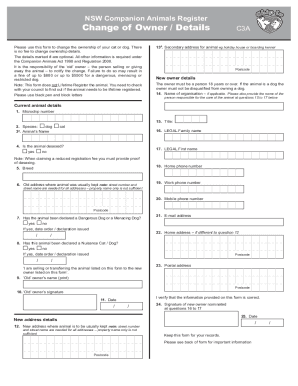
S for animal eg holiday house or boarding kennel The details marked # are optional. All other information is required under the Companion Animals Act 1998 and Regulation 2008. It is the responsibility of the old owner the person selling or giving away the animal to notify the change. Failure to do so may result in D QH RI XS WR RU XS WR IRU D GDQJHURXV PHQDFLQJ RU restricted dog. Note: This form does not Lifetime Register the animal. You need to check.

How it works

  1. Open form

    Open form follow the instructions

  2. Easily sign form

    Easily sign the form with your finger

  3. Share form

    Send filled & signed form or save

How to fill out the AU NSW Companion Animals Register C3A online

Filling out the AU NSW Companion Animals Register C3A form online is essential for changing the ownership details of your cat or dog. This guide provides clear, step-by-step instructions to help you complete the form accurately and efficiently.

Follow the steps to fill out the AU NSW Companion Animals Register C3A form online

  1. Click the ‘Get Form’ button to obtain the AU NSW Companion Animals Register C3A form and open it in your browser.
  2. Enter the microchip number of the animal in the designated field. This is a required field.
  3. Select the species of the animal (dog or cat) by marking the appropriate option.
  4. If applicable, enter the animal’s name in the provided field.
  5. Indicate whether the animal has been desexed by selecting 'yes' or 'no'. If claiming a reduced registration fee, proof of desexing must be submitted.
  6. Provide the breed of the animal in the specified area.
  7. Fill in the old address where the animal was usually kept. Include street number and name.
  8. Select whether the animal has been declared a Dangerous Dog or a Menacing Dog by marking 'yes' or 'no'.
  9. Confirm if the animal has been declared as a nuisance dog. If yes, enter the date the declaration was issued.
  10. Fill in the old owner's name as printed on the form.
  11. The old owner must sign and date the form to verify that the information provided is correct.
  12. Enter the new owner's details, including their title, legal family name, and legal first name.
  13. Provide the new owner's home phone number, work phone number, and mobile phone number.
  14. If the new owner’s home address is different from the one listed earlier, provide it here.
  15. The new owner must provide their signature and date in the designated fields.
  16. Review all the information filled out on the form before proceeding.
  17. Once all details are confirmed and correct, users can save the changes, download, print, or share the completed form.

Complete the AU NSW Companion Animals Register C3A online today to ensure proper ownership transfer.

Get form

Experience a faster way to fill out and sign forms on the web. Access the most extensive library of templates available.
Get form

Related content

0001564590-19-044972.txt : 20191202...
You should read the prospectus, including the Risk Factors set forth therein and the...
Learn more

Related links form

NY Application For S-56 Certificates Of Fitness For Construction Site Fire Safety Manager (CSFSM) 2017 MN Revocation Power Of Attorney NY Background Investigation Questionnaire 2021 LA Power Of Attorney Revocation Form

Questions & Answers

Get answers to your most pressing questions about US Legal Forms API.

Contact support

The previous owner's signature on the downloaded ownership transfer form. A bill of sale from the previous owner to you that includes the microchip number. A letter from a licensed veterinarian on their letterhead, stating that you are the owner of the animal. The letter must include the microchip number of your pet.

Registration. Registration is not always mandatory. ... Veterinary records. ... Microchipping. ... Tags. ... Recent photo of your pet. ... Adoption or purchase records. ... Consider a pet agreement form.

To establish that you're the owner of the dog, you should download an ownership transfer form and sign it. This owner also should have a bill sale made that includes the microchip number. That bill of sale should then be given to the person who is taking ownership of the dog. You'll also need to contact the dog's vet.

You can change the ownership of a cat or dog by 'claiming the pet' and updating its registration details on the NSW Pet Registry. If your dog or cat isn't registered, select the 'Register online' button. Log in, or create your MyServiceNSW Account. Enter your identity document details, if required.

Log in, or create your MyServiceNSW Account. Enter your identity document details, if required. Enter your pet's microchip number. Confirm all details are correct and contact the NSW Pet Registry or your local council if there are any inaccuracies.

The previous owner's signature on the downloaded ownership transfer form. A bill of sale from the previous owner to you that includes the microchip number. A letter from a licensed veterinarian on their letterhead, stating that you are the owner of the animal. The letter must include the microchip number of your pet.

transfer the registration online. transfer the registration by phoning Council on 07 3403 8888. transfer the registration by visiting Council.

Contact your usual vet, who may have recorded the number on their client records. Contact the implanter of the MicroChip, if not your usual vet. Take your pet to be scanned at the local vet, rescue centre or dog wardens service.

In New South Wales, the law states that no one person may have more than four dogs in their control when in a public place. There are currently no legal guidelines for the number of dogs you can have at home, though this looks set to change soon.

Get This Form Now!

Use professional pre-built templates to fill in and sign documents online faster. Get access to thousands of forms.
Get form
If you believe that this page should be taken down, please follow our DMCA take down processhere.
Get AU NSW Companion Animals Register C3A
Get form
  • Adoption
  • Bankruptcy
  • Contractors
  • Divorce
  • Home Sales
  • Employment
  • Identity Theft
  • Incorporation
  • Landlord Tenant
  • Living Trust
  • Name Change
  • Personal Planning
  • Small Business
  • Wills & Estates
  • Packages A-Z
  • Affidavits
  • Bankruptcy
  • Bill of Sale
  • Corporate - LLC
  • Divorce
  • Employment
  • Identity Theft
  • Internet Technology
  • Landlord Tenant
  • Living Wills
  • Name Change
  • Power of Attorney
  • Real Estate
  • Small Estates
  • Wills
  • All Forms
  • Forms A-Z
  • Other Templates
  • Legal Hub
  • About Us
  • Help Portal
  • Legal Resources
  • Blog
  • Affiliates
  • Contact Us
  • Delete My Account
  • Site Map
  • Industries
  • Forms in Spanish
  • Localized Forms
  • State-specific Forms
  • Forms Kit
  • Real Estate Handbook
  • All Guides
  • Notarize
  • Incorporation services
  • For Consumers
  • For Small Business
  • For Attorneys
  • USLegal
  • FormsPass
  • pdfFiller
  • signNow
  • altaFlow
  • DocHub
  • Instapage
Form Packages
  • Adoption
  • Bankruptcy
  • Contractors
  • Divorce
  • Home Sales
  • Employment
  • Identity Theft
  • Incorporation
  • Landlord Tenant
  • Living Trust
  • Name Change
  • Personal Planning
  • Small Business
  • Wills & Estates
  • Packages A-Z
Form Categories
  • Affidavits
  • Bankruptcy
  • Bill of Sale
  • Corporate - LLC
  • Divorce
  • Employment
  • Identity Theft
  • Internet Technology
  • Landlord Tenant
  • Living Wills
  • Name Change
  • Power of Attorney
  • Real Estate
  • Small Estates
  • Wills
  • All Forms
  • Forms A-Z
  • Other Templates
Customer Service
  • Legal Hub
  • About Us
  • Help Portal
  • Legal Resources
  • Blog
  • Affiliates
  • Contact Us
  • Delete My Account
  • Site Map
  • Industries
  • Forms in Spanish
  • Localized Forms
  • State-specific Forms
  • Forms Kit
Legal Guides
  • Real Estate Handbook
  • All Guides
Prepared for you
  • Notarize
  • Incorporation services
Our Customers
  • For Consumers
  • For Small Business
  • For Attorneys
Our Sites
  • USLegal
  • FormsPass
  • pdfFiller
  • signNow
  • altaFlow
  • DocHub
  • Instapage
Social Media
Call us now toll free:
+1 833 426 79 33
As seen in:
© Copyright 1999-2026 airSlate Legal Forms, Inc. 17 Station Street, Ste. 203, Brookline, MA 02445
  • Your Privacy Choices
  • Terms of Service
  • Privacy Notice
  • Content Takedown Policy
  • Bug Bounty Program