Loading
Get Canada Worksafe Bc 57w1 2022-2026
How it works
-

Open form follow the instructions
-

Easily sign the form with your finger
-

Send filled & signed form or save
How to fill out the Canada WorkSafe BC 57W1 online
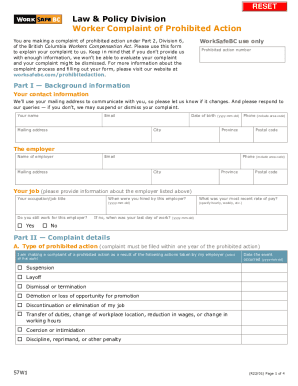
The Canada WorkSafe BC 57W1 form is used to file a complaint of prohibited action under the British Columbia Workers Compensation Act. This guide provides clear, step-by-step instructions for completing the form online, ensuring that you provide all necessary information to support your complaint.
Follow the steps to accurately complete your online complaint form.
- To begin, press the ‘Get Form’ button to access the complaint form and open it in your document editor.
- In Part I, provide your background information. Fill in your name, email address, mailing address, date of birth, city, phone number, province, and postal code. This information is crucial for communication regarding your complaint.
- Next, enter details about your employer. Include their name, email address, mailing address, phone number, city, province, and postal code.
- Continue by describing your job. State your occupation or job title, whether you still work for this employer, your date of hiring, your most recent rate of pay, and if applicable, your last day of work.
- In Part II, specify the type of prohibited action you are complaining about. Select all applicable actions taken by your employer, and provide the date each action occurred.
- If relevant, describe your complaint regarding failure to pay wages. Select the applicable reasons and provide further details.
- Address workplace health and safety issues you raised, explaining the issue and to whom you reported it.
- Describe the employer's actions that have led to your complaint.
- State the remedy you are seeking from WorkSafe BC. Indicate if you are interested in returning to your place of employment.
- If applicable, state whether you have filed any related compensation claims or other related proceedings.
- In Part IV, consent to the inquiries WorkSafe BC will make regarding your complaint. Provide your signature and date.
- Once the form is complete, review it for accuracy, and then save your changes. You can download, print, or share the form as needed.
Complete your document online today to ensure your complaint is filed successfully.