Loading
Get Canada Hc-sc 3011 2022-2026
How it works
-

Open form follow the instructions
-

Easily sign the form with your finger
-

Send filled & signed form or save
How to fill out the Canada HC-SC 3011 online
Filling out the Canada HC-SC 3011 form requires attention to detail and understanding of each section. This guide provides a step-by-step approach to help users navigate the form easily, ensuring all required fields are completed accurately.
Follow the steps to complete the Canada HC-SC 3011 form online.
- Click the ‘Get Form’ button to obtain the Canada HC-SC 3011 form and open it in your preferred online editor.
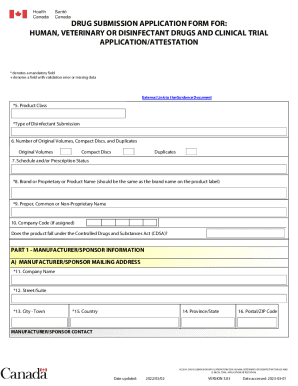
- Fill in the product class and type of disinfectant submission in the mandatory fields marked with an asterisk (*). Ensure that the information is consistent with the product label.
- Provide details about the number of original volumes, compact discs, and duplicates. This includes entering numbers for each relevant field.
- Complete the schedule and/or prescription status if applicable, along with the product name, both proprietary and common/non-proprietary, ensuring accuracy.
- Enter the manufacturer or sponsor information, including name, mailing address, and contact information. Mandatory fields marked with an asterisk (*) must be filled out appropriately.
- Specify if the submission is to be completed by a third party on behalf of the manufacturer or sponsor. Answer the related questions if applicable.
- Complete the drug product formulation information section, including active and non-medicinal ingredients, proposed shelf life, and dosage form. Ensure all units and details are clearly indicated.
- Review all entries to confirm their accuracy, then proceed to save your changes. You may also download, print, or share the completed form as needed.
Take the next step and complete your Canada HC-SC 3011 form online today!