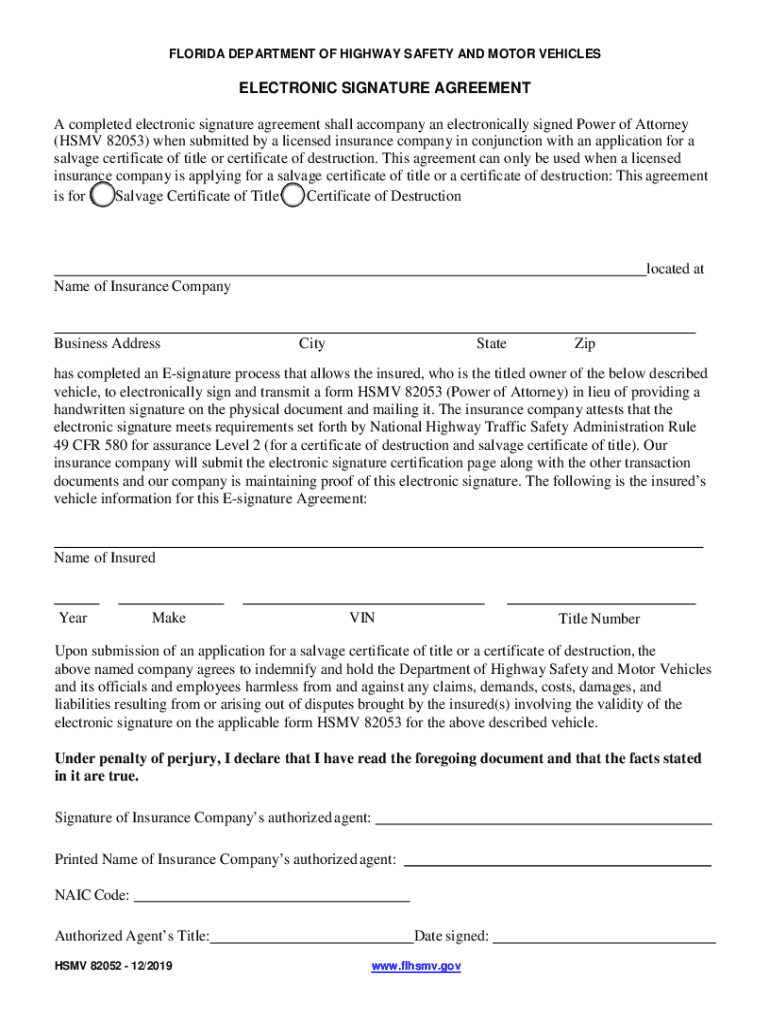
3) when submitted by a licensed insurance company in conjunction with an application for a salvage certificate of title or certificate of destruction. This agreement can only be used when a licensed insurance company is applying for a salvage certificate of title or a certificate of destruction: This agreement is for Salvage Certificate of Title Certificate of Destruction located at Name of Insurance Company Business Address City State Zip has completed an E-signature process that allows t.
Loading

Open form follow the instructions

Easily sign the form with your finger

Send filled & signed form or save
How to fill out the FL HSMV 82052 online
Completing the FL HSMV 82052 form online is a straightforward process that ensures your electronic signature is properly documented. This guide provides step-by-step instructions to help you successfully navigate the form.
Follow the steps to complete the FL HSMV 82052 form online.
- Click ‘Get Form’ button to obtain the form and open it in the online editor.
- Fill in the name of the insurance company in the designated field. Ensure that the name matches the records maintained by the insurance provider.
- Enter the business address of the insurance company, including the street, city, state, and zip code in the appropriate sections.
- Input the name of the insured person, which refers to the titled owner of the vehicle associated with the agreement.
- Provide detailed information about the vehicle, including the year, make, VIN (Vehicle Identification Number), and title number. These pieces of information are crucial for processing the application.
- Once all fields are filled out, review the information for accuracy. It is important that the details are correct before submission.
- Proceed to electronically sign the document. The authorized agent from the insurance company must sign and print their name, including their NAIC code and title.
- Date the signature to complete the form. Ensure that the date corresponds with the electronic signing process.
- After confirming all information is accurate, you can save changes, download, print, or share the completed FL HSMV 82052 form as needed.
Complete your FL HSMV 82052 form online today to ensure a smooth and efficient application process.
Experience a faster way to fill out and sign forms on the web. Access the most extensive library of templates available.
Related content
A completed electronic signature agreement shall accompany an electronically signed Power...
Sorted by Form Number · 81409: Mobile Home Dealer Installer License Application · 82002:...
A completed electronic signature agreement shall accompany an electronically signed Power...
Get answers to your most pressing questions about US Legal Forms API.
Can you register a car in Florida with a power of attorney?
A Florida motor vehicle power of attorney form may be used to elect a person to handle a title transfer (Sale) or application, as well as register the operating vehicle with the Florida Department of Highway Safety and Motor Vehicles (Find Office).
How do I fax from Florida DMV?
The fax number is (850) 617-5158.
How do I get my title from the DMV Florida?
In Florida, to obtain a certificate of title you must, at minimum, have the following: Proof of identity: A driver license or identification card from any state, or a passport. Identification must be current and valid. Proof of ownership: A Manufacturer's Certificate of Origin or out-of-state title.
Does Florida DMV power of attorney need to be notarized?
Section 709.2105(2), Florida Statutes, states: A power of attorney must be signed by the principal and by two subscribing witnesses and be acknowledged by the principal before a notary public or as otherwise provided in s. 695.03.
What is a vehicle power of attorney state of Florida?
A Florida motor vehicle power of attorney permits the titleholder of a vehicle in Florida to appoint a trusted individual to represent the owner in all matters involving his or her vehicle or motorhome or vessel with the Department of Highway Safety and Motor Vehicles.
Does a power of attorney need to be recorded in Florida?
An original power of attorney may be required to be recorded into the Official Records if it is relied upon to affect title to real property. Please seek legal advice regarding use of a power of attorney or review Florida Statute 709 Part II.
What is HSMV 82053?
Florida Motor Vehicle Power of Attorney (Form HSMV 82053)
How do I file a power of attorney in Florida?
How to make a Florida power of attorney Decide which type of power of attorney to make. ... Decide who you want to be your agent. ... Decide what authority you want to give your agent. ... Get a power of attorney form. ... Complete the form, sign it, and have it notarized or witnessed.
Use professional pre-built templates to fill in and sign documents online faster. Get access to thousands of forms.
If you believe that this page should be taken down, please follow our DMCA take down process here.