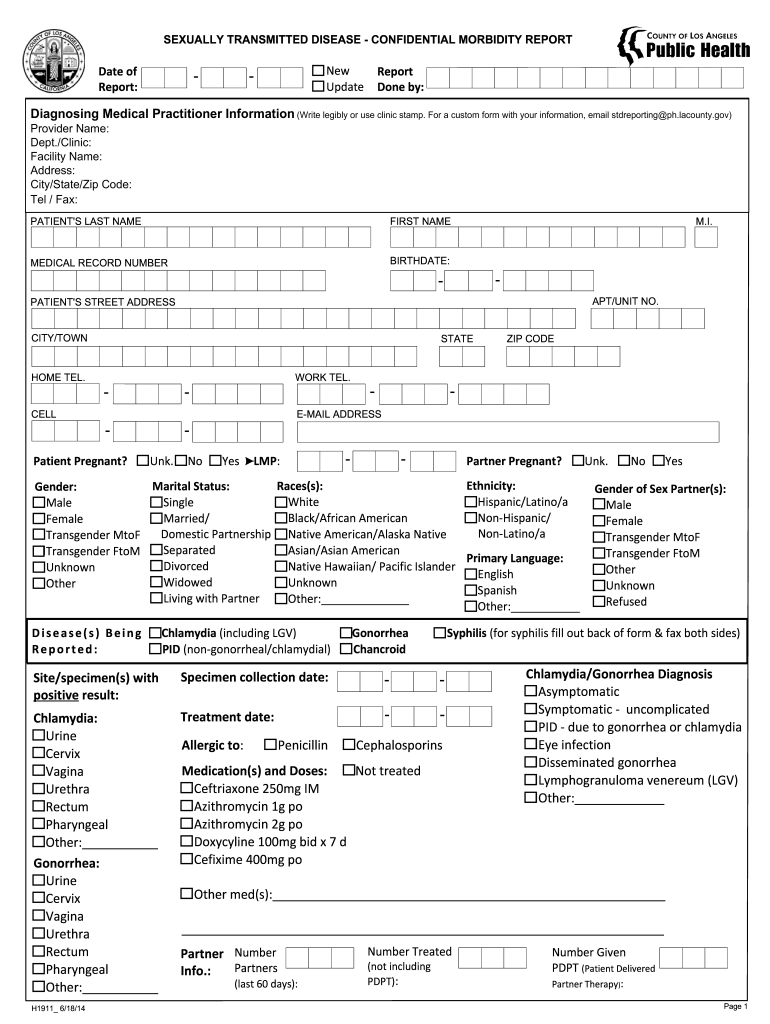
Custom form with your information, email stdreporting@ph.lacounty.gov) Provider Name: Dept./Clinic: Facility Name: Address: City/State/Zip Code: Tel / Fax: PATIENT'S LAST NAME FIRST NAME MEDICAL RECORD NUMBER BIRTHDATE: M.I. - - APT/UNIT NO. PATIENT'S STREET ADDRESS CITY/TOWN HOME TEL. CELL STATE - Patient Pregnant? WORK TEL. - - E-MAIL ADDRESS Unk. - ZIP CODE No Yes LMP: - - Partner Pregnant? Ethnicity: Races(s): Marital Status: Gender: Hispanic/Latino/a White Single M.
Loading

Open form follow the instructions

Easily sign the form with your finger

Send filled & signed form or save
How to fill out the CA H1911 online
The CA H1911 form is essential for reporting sexually transmitted diseases. This guide provides clear, step-by-step instructions on how to fill out the form online, ensuring your completion is thorough and accurate.
Follow the steps to ensure accurate completion of the CA H1911 form.
- Click ‘Get Form’ button to access the CA H1911 form and open it for completion.
- Begin by entering the date of the report and indicate whether it is a new report or an update. This initial information is critical for tracking purposes.
- Next, provide diagnosing medical practitioner information, including full name, department or clinic, facility name, address, city, state, zip code, and contact numbers. It's important to write legibly or use your clinic stamp to ensure clarity.
- Fill in the patient's information, including their last name, first name, middle initial, birthdate, medical record number, and street address. Ensure the provided numbers and dates are accurate.
- Indicate whether the patient is pregnant and provide details of the last menstrual period. This information is vital for appropriate medical follow-up.
- Report the patient's ethnicity, race, marital status, gender, and primary language. Use the provided options to ensure consistent data collection.
- For the diseases being reported, check the appropriate boxes for conditions like chlamydia, gonorrhea, or syphilis. Enter any relevant specimen collection and treatment dates.
- Document any allergies the patient may have and list the medications and doses they have received. It's crucial to note both treated and untreated scenarios.
- Complete sections on partner information, including gender and treatment status. Collect details about partners from the last 60 days regarding treatment received.
- Finally, review the entire form for completeness and accuracy. Once satisfied, you can save changes, download, print, or share the form as needed.
Ensure accurate health reporting by completing the CA H1911 form online today.
Experience a faster way to fill out and sign forms on the web. Access the most extensive library of templates available.
Related content
by MJ Cipolla · 2012 · Cited by 66 — We found that serum from pregnant, but not...
1. 1(gesz2) 1(u) u8 1(gesz2) 1(u) udu ki er3-pa2-dan-ta · 2. 2(u) 8(disz) u8 ki...
Get answers to your most pressing questions about US Legal Forms API.
How to file form SI 100 in California?
To file form SI 100 in California, start by gathering the necessary information about your business, including its legal name and registration number. You can file this form online through the California Secretary of State's portal or by submitting a paper form. Online filing is often faster and more convenient. If you prefer assistance throughout the process, uslegalforms is an excellent resource for managing your CA H1911 requirements.
Does California accept amended returns electronically?
Yes, California accepts amended returns electronically, which streamlines the process for businesses. You can file your amended return through the California Secretary of State's online platform. Make sure you have all your required documents and the original return information. For additional guidance, uslegalforms can provide the resources needed for a smooth amended filing experience related to the CA H1911.
How do I file a California corporate disclosure statement?
Filing a California corporate disclosure statement involves several steps. First, you need to gather your business information, including the legal name and address. Then, you can file either online through the California Secretary of State's website or by mail. Online submissions via uslegalforms can be a time-saving option, ensuring you complete the CA H1911 accurately and efficiently.
Can you file CA statement of information online?
Yes, you can file the CA statement of information online through the California Secretary of State's website. The online process is straightforward and allows you to submit your information quickly. Be sure to have your business's identification details handy, as you'll need them to complete the form. If you're looking for an easier way to handle this, consider using uslegalforms for assistance with your CA H1911 filing.
How to file California corporate disclosure statement online?
To file the California corporate disclosure statement online, visit the California Secretary of State's website. You will need to create an account or log in to access the filing system. Once logged in, navigate to the section for business filings, select the CA H1911 form, enter the required information, and submit your application. Using platforms like uslegalforms can simplify this process by guiding you through each step.
How to fill out CA Live Scan form?
Completing the CA Live Scan form requires you to provide specific personal details, including your name, address, and the purpose of the fingerprinting. Ensure all information is accurate and matches your ID. Trust uslegalforms to offer you a compliant CA H1911 template that assists you in navigating the form-filling process with ease.
How to fill out California resale certificate?
When filling out a California resale certificate, begin by including your seller's permit number and the buyer's information. Clearly state the type of items being purchased for resale. This step ensures compliance with tax regulations. To make this task easier, uslegalforms provides templates that align with the CA H1911 forms, streamlining the experience.
How to fill out a fingerprint card in California?
To fill out a fingerprint card in California, carefully follow the format provided on the card itself. You will need to provide your full name, date of birth, and reason for the fingerprinting. Remember to sign the card where indicated. Using uslegalforms can simplify this process, as they offer templates that meet the CA H1911 criteria.
How to fill out Live Scan form in California?
Filling out the Live Scan form in California involves several straightforward steps. First, complete the form with your personal information, such as name, address, and reason for fingerprinting. Ensure all details align with your identification documents. You can access a reliable Live Scan form through uslegalforms, which ensures compliance with CA H1911 standards.
How to fill out CA state tax form?
To fill out the CA state tax form, start by gathering your financial documents, such as W-2s and 1099s. Next, follow the instructions provided on the form carefully, ensuring you input accurate information regarding income, deductions, and credits. You can easily find resources online, including uslegalforms, that guide you through the process and provide forms that comply with CA H1911 regulations.
Use professional pre-built templates to fill in and sign documents online faster. Get access to thousands of forms.
If you believe that this page should be taken down, please follow our DMCA take down process here.