Loading
Get Student Portal Registration And Login Procedures
How it works
-

Open form follow the instructions
-

Easily sign the form with your finger
-

Send filled & signed form or save
How to fill out the Student Portal Registration and Login Procedures online
This guide provides a clear and supportive approach to help users navigate the Student Portal Registration and Login Procedures. Whether you are registering for the first time or logging in, this document outlines essential steps for a smooth experience.
Follow the steps to complete your registration and login
- Press the ‘Get Form’ button to access the form and open it in your preferred editor.
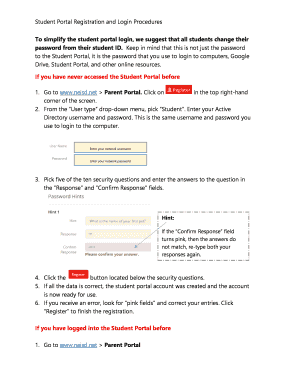
- For first-time users, navigate to the designated website and select 'Student' from the ‘User type’ drop-down menu. Enter your Active Directory username and password, which are the same as your computer login credentials.
- Input your network username and network password.
- Choose five security questions from the list of ten and input your answers in the ‘Response’ and ‘Confirm Response’ fields. Ensure that the answers match; if the ‘Confirm Response’ field turns pink, revise your answers.
- Click the button located beneath the security questions to proceed with your account creation.
- If all information is accurate, your student portal account will be successfully created and ready for use. If you encounter an error, check for any pink fields and correct your entries, then click ‘Register’ to finalize the registration.
- If you have previously logged in, repeat the steps to navigate to the login page, select 'Student' from the drop-down, and enter your Active Directory username and password before clicking the Login button.
- If your password is still your student ID, you will be prompted to verify your identity by answering the three security questions. Click OK after submission.
- To enhance your login experience, consider changing your password by following the instructions provided in the portal. Remember to adhere to password requirements for security robustness.
- Once all steps are completed, you can save changes, download, print, or share your form as needed.
Start filling out your Student Portal Registration and Login Procedures online today!
0:03 1:27 And click on save. So now we've got our student account we need to fill in some more. Details. So weMoreAnd click on save. So now we've got our student account we need to fill in some more. Details. So we click on edit in the top right corner again.
Industry-leading security and compliance
US Legal Forms protects your data by complying with industry-specific security standards.
-
In businnes since 199725+ years providing professional legal documents.
-
Accredited businessGuarantees that a business meets BBB accreditation standards in the US and Canada.
-
Secured by BraintreeValidated Level 1 PCI DSS compliant payment gateway that accepts most major credit and debit card brands from across the globe.