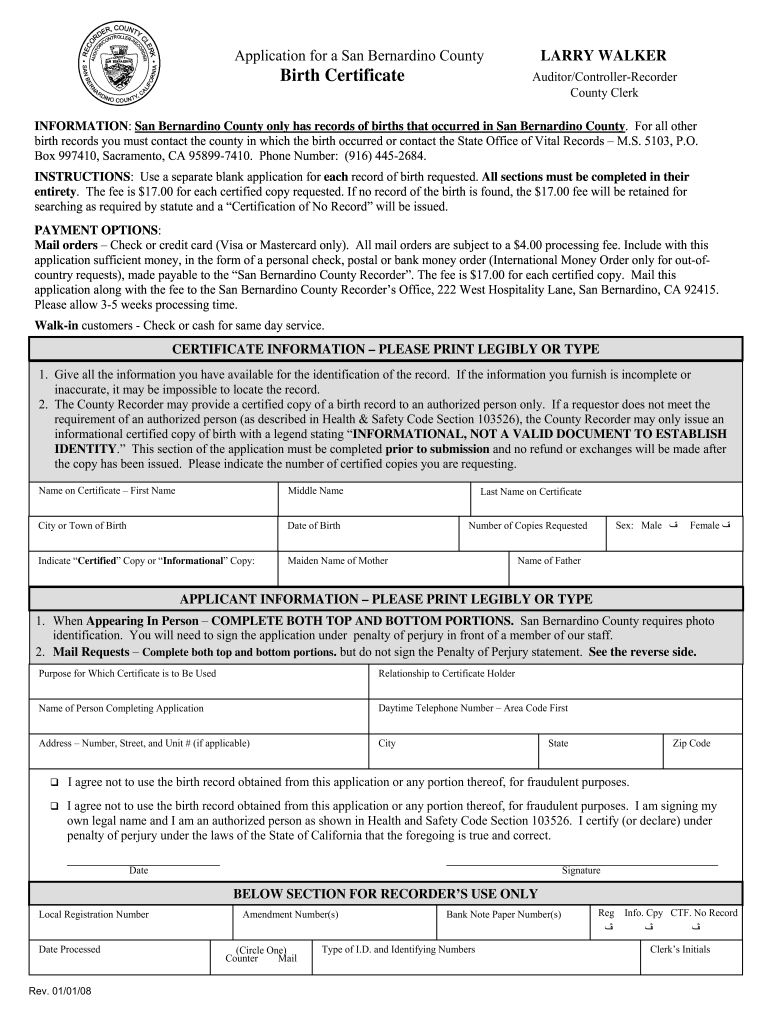
A separate blank application for each record of birth requested. All sections must be completed in their entirety. The fee is $17.00 for each certified copy requested. If no record of the birth is found, the $17.00 fee will be retained for searching as required by statute and a “Certification of No Record” will be issued. PAYMENT OPTIONS: Mail orders – Check or credit card (Visa or Mastercard only). All mail orders are subject to a $4.00 processing fee. Include with this application suffic.

Open form follow the instructions

Easily sign the form with your finger

Send filled & signed form or save
How to fill out the CA birth certificate online
This guide provides comprehensive instructions on how to fill out the CA birth certificate application online, ensuring that all necessary information is accurately provided. Whether you are obtaining the certificate for yourself or someone else, following these steps will help you navigate the process smoothly.
Follow the steps to complete your CA birth certificate application online
- Click ‘Get Form’ button to access the CA birth certificate application form and open it in your preferred editor.
- Begin by filling out the certificate information section. Enter all available details for identifying the record, including the name on the certificate, city or town of birth, and date of birth. Ensure that every field is completed accurately.
- Indicate if you are requesting a certified copy or an informational copy. Provide the maiden name of the mother, the last name on the certificate, and the sex of the individual as either male or female.
- Proceed to the applicant information section. Fill in your relationship to the certificate holder, your name, daytime telephone number, and complete address. Be sure to fill out both top and bottom portions to ensure proper processing.
- Review the agreement regarding the use of the birth record and ensure you understand your responsibilities. Confirm your status as an authorized person if applicable, and include your signature and date of signing.
- Before submitting, review all entries for accuracy. Once confirmed, you can choose to save the form, download it, print it, or share it according to your needs.
Start filling out your CA birth certificate application online today.
Experience a faster way to fill out and sign forms on the web. Access the most extensive library of templates available.
Related content
CA.Gov State of California Logo. Google Tag Manager. + Increase Text Resize ... Vital...
by USSCOFL BIRTH — U.S. STANDARD CERTIFICATE OF LIVE BIRTH. LOCAL FILE NO. BIRTH NUMBER:...
by JA Martin · 2018 · Cited by 1980 — Twin and triplet and higher-order multiple birth...
Get answers to your most pressing questions about US Legal Forms API.
How do I update my birth certificate in California?
To update your CA Birth Certificate in California, you must submit a request along with the necessary legal documents that support your changes, such as a court order for a name change. This process results in either a new certificate or an endorsement on the existing record. For assistance, US Legal Forms provides forms and guidance to help you through the process.
How long does it take to get a replacement birth certificate in California?
The time it takes to receive a replacement CA Birth Certificate in California varies depending on the method of application. If you apply online or by mail, expect processing to take around 2 to 4 weeks. However, if you visit a County Recorder office in person, you might receive your replacement on the same day.
How do I register my birth in California?
To register your birth in California, the attending physician or midwife typically submits the birth certificate information to the local register. If you are registering a birth after the fact, you will need to submit a completed birth certificate application along with supporting documents. This is crucial to ensure your CA Birth Certificate is accurately recorded.
Does California automatically send birth certificate?
California does not automatically send out CA Birth Certificates following a birth. Parents need to apply for the certificate through the Vital Records office. You can often request a certified copy at the hospital where the birth occurred, but ensure that you follow up to secure your records.
Can you get your birth certificate in person in California?
Yes, you can obtain your CA Birth Certificate in person at designated County Recorder offices throughout California. This option allows you to receive your certificate immediately, as long as you have the necessary identification and documentation ready. It's a convenient choice if you need your certificate quickly.
How does filling out a birth certificate work?
Filling out a CA Birth Certificate involves collecting necessary information about the child, including their name, date of birth, and parents' details. This information is then formalized on the certificate, which serves as the child's official record. It is crucial to be thorough and accurate during this process to avoid complications later.
How to correct spelling of name on birth certificate in California?
To correct a misspelled name on a CA Birth Certificate, you must file for an amendment with the California Department of Public Health. You will need to complete an application and submit documents supporting the correct spelling. This ensures that your child's official records accurately reflect their identity.
Do I have to put my father on my birth certificate in California?
In California, it is not mandatory to include the father's name on the CA Birth Certificate. However, including it can provide legal recognition and support for the child's rights. If the father's name is not included initially, it can be added later through the proper legal channels.
When filling out a birth certificate, what guidelines are typically followed?
When completing a CA Birth Certificate, it's essential to follow guidelines that include accurate names, dates, and places of birth. Each state may have its specific requirements, so checking California's guidelines is crucial. Proper adherence to these rules helps prevent delays in processing your birth certificate.
How to fill out a birth certificate template?
Filling out a CA Birth Certificate template involves providing accurate personal information about the child and parents. Ensure you follow the template's structure closely and double-check each field before submission. If you need assistance, USLegalForms offers templates and guidance to streamline the process.
Use professional pre-built templates to fill in and sign documents online faster. Get access to thousands of forms.
If you believe that this page should be taken down, please follow our DMCA take down process here.