Loading
Form preview
  • US Legal Forms
  • Other Templates
  • More Forms
  • More Multi-State Forms
  • How To Reactivate Standard Chartered Bank Account

Get How To Reactivate Standard Chartered Bank Account

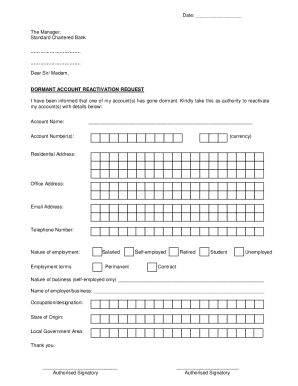
Date: The Manager, Standard Chartered Bank. . Dear Sir/ Madam, DORMANT ACCOUNT REACTIVATION REQUEST I have been informed that one of my account(s) has gone dormant. Kindly take this as authority to.

How it works

  1. Open form

    Open form follow the instructions

  2. Easily sign form

    Easily sign the form with your finger

  3. Share form

    Send filled & signed form or save

How to fill out the How To Reactivate Standard Chartered Bank Account online

This guide provides you with clear, step-by-step instructions to successfully fill out the How To Reactivate Standard Chartered Bank Account form online. Whether you are reactivating your personal or business account, we aim to support you through the process.

Follow the steps to complete your reactivation request.

  1. Press the ‘Get Form’ button to acquire the form and open it in the editing environment.
  2. Begin by entering your account name in the provided field. Make sure to enter the full name associated with the bank account you wish to reactivate.
  3. Next, input your account number(s) accurately in the designated sections. Include the currency type next to the account number for clarity.
  4. Fill in your residential address in the appropriate field. Ensure that this address matches your identification documents.
  5. Provide your office address, if applicable. If you are currently unemployed or a student, you may leave this section blank.
  6. Enter your email address in the specified field to ensure that the bank can contact you regarding your request.
  7. Input your telephone number. This should be a working number where you can be reached for any follow-up inquiries.
  8. Indicate your nature of employment by selecting the appropriate option from the provided choices, such as 'salaried,' 'self-employed,' or 'unemployed.'
  9. If you are self-employed, briefly describe the nature of your business in the designated space.
  10. State the name of your employer or business as applicable. This should correspond to the employment field previously filled.
  11. Enter your occupation or designation. This provides the bank with further details about your professional status.
  12. Fill in your state of origin and local government area in their respective fields to complete your address details.
  13. Finally, ensure all required fields are filled out completely. Proceed to save the changes, download, print, or share the form as needed.

Complete the document online for a smooth reactivation process.

Get form

Experience a faster way to fill out and sign forms on the web. Access the most extensive library of templates available.
Get form

Related content

EX-10.28 - SEC.gov
Facility Agent means Standard Chartered Bank or any person as may be appointed as facility...
Learn more
(PDF) Alternate Channels of Banking | S.M.MAHEDI...
Standard Chartered Bank(SCB)'s online banking services entail 24/7 account check...
Learn more
Remote Support 22.3 Cloud Admin Guide...
Log in to the user administrative interface by going to your B Series Appliance's URL...
Learn more

Related links form

WCAB CA Form 10250.1_ver7-2010 - Dir Ca Fill Musc Form Sample Cobra Enrollment Form And Letter How Do I Complete The Wageworks Hippa Authorization Form

Questions & Answers

Get answers to your most pressing questions about US Legal Forms API.

Contact support

The process of reactivating your bank account is a hassle-free one: You must submit a written application to the bank. For joint accounts, signatures of all accountholders will be needed, irrespective of a single or joint operating mode. You will have to submit your KYC (Know Your Customer) documents.

Activate Dormant Account. To activate an account that has not been operated for more than two years and has become dormant, you need to visit your branch in person. Take photocopies and originals of address and identity proof with you.

The account owner can request the bank to reactivate a dormant account. First, the bank would ask them to present several documents, including account number, identification, and other proofs. Then, the person usually has to do some transactions to ensure that the account is reactivated.

Standard Chartered Bank provides a facility to reactivate a Dormant Account from any of the following ways: Submit a request for activation of your account through Internet banking. ... By Calling the Customer Care Number of Standard Chartered Bank. ... By Contacting your home branch of Standard Chartered Bank.

Here is how you can activate your dormant account: Step1. Visit the branch and submit written application with your signature a sper operating instructions in the account. Step2. Submit self-attested proof of identity and address. Step3. Initiate any transaction and your account will be activated once again.

For re-activation of the Dormant account client shall provide a written request for removal or dormancy along with a supporting identity [CNIC / SNIC / Passport (for foreign nationals only)] document duly attested/Original Seen by the Bank Official.

Standard Chartered Bank provides a facility to reactivate a Dormant Account from any of the following ways: Submit a request for activation of your account through Internet banking. ... By Calling the Customer Care Number of Standard Chartered Bank. ... By Contacting your home branch of Standard Chartered Bank.

Get This Form Now!

Use professional pre-built templates to fill in and sign documents online faster. Get access to thousands of forms.
Get form
If you believe that this page should be taken down, please follow our DMCA take down processhere.
Get How To Reactivate Standard Chartered Bank Account
Get form
  • Adoption
  • Bankruptcy
  • Contractors
  • Divorce
  • Home Sales
  • Employment
  • Identity Theft
  • Incorporation
  • Landlord Tenant
  • Living Trust
  • Name Change
  • Personal Planning
  • Small Business
  • Wills & Estates
  • Packages A-Z
  • Affidavits
  • Bankruptcy
  • Bill of Sale
  • Corporate - LLC
  • Divorce
  • Employment
  • Identity Theft
  • Internet Technology
  • Landlord Tenant
  • Living Wills
  • Name Change
  • Power of Attorney
  • Real Estate
  • Small Estates
  • Wills
  • All Forms
  • Forms A-Z
  • Other Templates
  • Legal Hub
  • About Us
  • Help Portal
  • Legal Resources
  • Blog
  • Affiliates
  • Contact Us
  • Delete My Account
  • Site Map
  • Industries
  • Forms in Spanish
  • Localized Forms
  • State-specific Forms
  • Forms Kit
  • Real Estate Handbook
  • All Guides
  • Notarize
  • Incorporation services
  • For Consumers
  • For Small Business
  • For Attorneys
  • USLegal
  • FormsPass
  • pdfFiller
  • signNow
  • altaFlow
  • DocHub
  • Instapage
Form Packages
  • Adoption
  • Bankruptcy
  • Contractors
  • Divorce
  • Home Sales
  • Employment
  • Identity Theft
  • Incorporation
  • Landlord Tenant
  • Living Trust
  • Name Change
  • Personal Planning
  • Small Business
  • Wills & Estates
  • Packages A-Z
Form Categories
  • Affidavits
  • Bankruptcy
  • Bill of Sale
  • Corporate - LLC
  • Divorce
  • Employment
  • Identity Theft
  • Internet Technology
  • Landlord Tenant
  • Living Wills
  • Name Change
  • Power of Attorney
  • Real Estate
  • Small Estates
  • Wills
  • All Forms
  • Forms A-Z
  • Other Templates
Customer Service
  • Legal Hub
  • About Us
  • Help Portal
  • Legal Resources
  • Blog
  • Affiliates
  • Contact Us
  • Delete My Account
  • Site Map
  • Industries
  • Forms in Spanish
  • Localized Forms
  • State-specific Forms
  • Forms Kit
Legal Guides
  • Real Estate Handbook
  • All Guides
Prepared for you
  • Notarize
  • Incorporation services
Our Customers
  • For Consumers
  • For Small Business
  • For Attorneys
Our Sites
  • USLegal
  • FormsPass
  • pdfFiller
  • signNow
  • altaFlow
  • DocHub
  • Instapage
Social Media
Call us now toll free:
+1 833 426 79 33
As seen in:
© Copyright 1999-2026 airSlate Legal Forms, Inc. 17 Station Street, Ste. 203, Brookline, MA 02445
  • Your Privacy Choices
  • Terms of Service
  • Privacy Notice
  • Content Takedown Policy
  • Bug Bounty Program