Loading
Get Canada T777 E 2020-2026
How it works
-

Open form follow the instructions
-

Easily sign the form with your finger
-

Send filled & signed form or save
How to fill out the Canada T777 E online
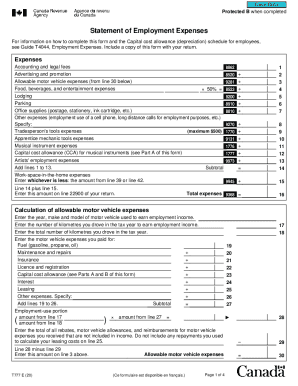
The Canada T777 E form, known as the Statement of Employment Expenses, is essential for individuals claiming employment-related expenses on their tax returns. This guide will provide you with clear, step-by-step instructions on how to fill out this form online.
Follow the steps to complete your Canada T777 E accurately.
- Click ‘Get Form’ button to obtain the form and open it in the editor.
- Begin by entering your personal information in the designated fields. This includes your full name, address, and social insurance number.
- Move on to the expenses section. You will need to detail various employment expenses such as accounting fees, parking, office supplies, and more. Ensure you specify the amounts for each category.
- For tradesperson’s tools expenses, include the costs as specified in the form. Remember, there is a maximum limit of $500.
- Next, focus on the calculation of allowable motor vehicle expenses. Enter the year, make, and model of the vehicle used for earning income. Then, provide the number of kilometers driven for employment.
- Continue by detailing the total motor vehicle expenses incurred including fuel, maintenance, insurance, and any other relevant costs. These will be used to determine the employment-use portion.
- Proceed to the work-space-in-the-home calculations. Include any home-related expenses like electricity, maintenance, and property taxes, and calculate the employment-use portion.
- Once you have entered all the necessary information, review the form thoroughly for accuracy.
- Finally, save your changes, download, print, or share the form as needed.
Complete your Canada T777 E form online today to ensure you claim all entitled employment expenses.
If you're a salaried or commission employee, then you'll use a T777 to claim any employment expenses to which you are entitled. If you're a transportation or trucking employee, then you will use a TL2.