Loading
Get Co Dor 104 2008-2026
How it works
-

Open form follow the instructions
-

Easily sign the form with your finger
-

Send filled & signed form or save
How to fill out the CO DoR 104 online
Filling out the Colorado Individual Income Tax Return CO DoR 104 online can streamline your tax filing process. This guide provides detailed, step-by-step instructions to help you accurately complete each section of the form with confidence.
Follow the steps to successfully complete the CO DoR 104 online:
- Press the ‘Get Form’ button to access the CO DoR 104 form electronically.
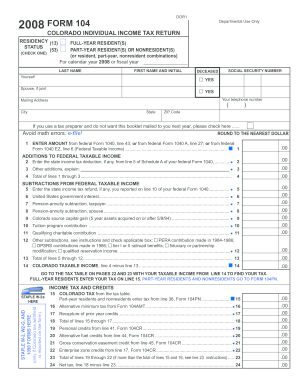
- Begin with the residency section and select the appropriate status: full-year resident, part-year resident, or nonresident. Make sure to check the box that accurately reflects your tax situation for the calendar year or fiscal year.
- Enter your last name and first name, along with your social security number. If applicable, include your spouse’s information as well, especially if filing jointly.
- Fill in your telephone number and mailing address. Ensure this information is accurate for any correspondence from the tax authorities.
- Report your federal taxable income based on the instructions provided, and carry the value from federal Form 1040, line 43; federal Form 1040 A, line 27; or federal Form 1040 EZ, line 6, to line 1 of the form.
- Add any additional amounts to your federal taxable income as required in lines 2 and 3. Provide clear explanations where necessary for any notes made.
- Calculate your total additions and enter the total in line 4. This will give you a foundational value for building out your Colorado taxable income.
- Proceed to subtractions, entering data for items such as state income tax refunds and United States government interest in the respective lines 5, 6, and others as found in the document.
- Once totals for both additions and subtractions are completed, calculate your Colorado taxable income and transfer the value to line 14.
- Refer to the tax table provided in the forms to determine your based income tax and fill it in line 15 according to whether you are a full-year resident or otherwise.
- Complete the income tax and credits section, adding up applicable credits and entering the sums in designated lines up to line 23.
- Finally, review the refund section, confirming all potential overpayments or amounts owed. Complete your form with your signature, and don’t forget to include your spouse’s signature if filing jointly, along with the necessary dates and other required information.
- At the conclusion, save your changes, download or print the completed form, or share it as needed for filing.
Start completing your CO DoR 104 online now for a smooth filing experience!
If claiming a subtraction and filing by paper, you must submit this schedule with your return. Use this schedule to report any subtractions from your Federal Taxable Income.