Loading
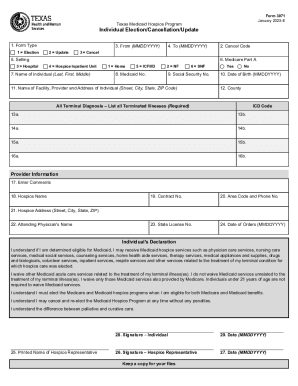
Get Tx Form 3071 2023-2026
How it works
-

Open form follow the instructions
-

Easily sign the form with your finger
-

Send filled & signed form or save
How to fill out the TX Form 3071 online
Filling out the TX Form 3071 online can be a straightforward process when you understand the components and requirements. This guide provides step-by-step instructions to help you accurately complete the form, ensuring that all necessary information is provided.
Follow the steps to complete the TX Form 3071 accurately.
- Click the ‘Get Form’ button to obtain the form and open it in the online editor.
- Begin by selecting the Form Type, choosing between Election, Update, or Cancel options corresponding to your situation.
- Enter the 'From' date (MMDDYYYY) and 'To' date (MMDDYYYY) as required for the documentation.
- Indicate the Setting by choosing one of the listed options: Home, Hospital, ICF/IID, NF, SNF, or Hospice Inpatient Unit.
- Fill in the Name of the Individual including last, first, and middle names as well as their Medicaid number and Social Security number.
- Provide the Date of Birth (MMDDYYYY) of the individual and their County.
- List all Terminal Diagnosis and corresponding ICD Codes as required in the appropriate fields (13a, 13b, etc.).
- Complete the Provider Information section with any relevant comments, as well as the Hospice Name, Contract Number, and contact information.
- Fill in the Hospice Address and Attending Physician's Name accurately to ensure proper processing.
- Review the Individual's Declaration statements and provide the Printed Name and Signature of both the Individual and the Hospice Representative along with the respective dates.
- After ensuring all fields are correctly completed, you can save your changes. Options will include downloading, printing, or sharing the completed form.
Begin completing documents online today for a seamless experience.
Call toll-free at 800-252-8263, 2-1-1 or 877-541-7905. Choose English or Spanish. Choose option 2. The person you speak with can help you find out if you have Medicaid or not.