Loading
Form preview
  • US Legal Forms
  • Form Library
  • More Forms
  • More Multi-State Forms
  • Eis3 Claim Form Pdf

Get Eis3 Claim Form Pdf

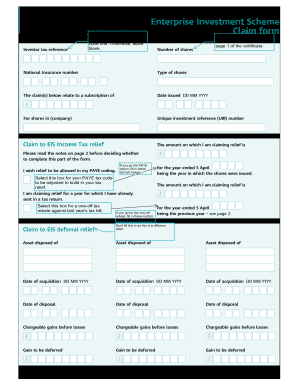
Investor tax referenceEnter your Unique Taxpayer Reference (UTC) here if you have one. Otherwise, leave blank. Enterprise Investment Scheme Claim form Take this and other info from the information.

How it works

  1. Open form

    Open form follow the instructions

  2. Easily sign form

    Easily sign the form with your finger

  3. Share form

    Send filled & signed form or save

How to fill out the EIS3 Claim Form PDF online

Filling out the EIS3 Claim Form PDF online can seem daunting, but with clear guidance, you can complete it accurately and efficiently. This guide will walk you through each section and field, ensuring you understand the process and maximize your claim.

Follow the steps to accurately complete the EIS3 Claim Form PDF

  1. Click the ‘Get Form’ button to access the EIS3 Claim Form PDF and open it in your preferred PDF editor.
  2. Begin by entering your Unique Taxpayer Reference (UTR) in the designated field. If you do not have a UTR, you may leave this section blank.
  3. In the 'Enterprise Investment Scheme Claim Form' section, refer to page 1 of your certificate to complete the number of shares and type of shares accurately.
  4. Fill in the date of issuance for your shares in the 'Date issued' field using the format DD MM YYYY.
  5. Provide the Unique Investment Reference (UIR) number related to your claim for EIS Income Tax relief.
  6. Indicate the amount on which you are claiming relief by entering the sum in the specified field.
  7. If you wish to have relief applied directly to your PAYE tax code, select the appropriate box and fill in the required fields for the amount of relief.
  8. If you are claiming relief for a prior tax year, select the corresponding box and enter the amount claimed and the relevant year ending on 5 April.
  9. For claims related to EIS deferral relief, list any assets disposed of along with their date of acquisition and date of disposal, and provide the chargeable gains before losses for each asset.
  10. Complete the declaration section by providing your name in capital letters, signature, full address, and date, ensuring all details are correct to the best of your knowledge.
  11. Once all fields are accurately filled out, save your changes. You may then download, print, or share the completed form as necessary.

Take action now and complete your EIS3 Claim Form PDF online to secure your tax relief benefits.

Get form

Experience a faster way to fill out and sign forms on the web. Access the most extensive library of templates available.
Get form

Related content

EIS 1105 State Data Exchange (SDX) - Policies and...
May 1, 2011 — The T30 process allows SSA to terminate an existing record and establish a...
Learn more
CAMPUS MASTER PLAN - UW Facilities
Mar 17, 2017 — The Draft EIS (DEIS) for the Campus Master Plan for the University of...
Learn more
Transponder Holder TH22A01KNX TH22A11KNX Product...
When the device is opened the right to claim under guarantee expires. ... In the device...
Learn more

Related links form

Par Graduate Student Discount Order Form KNOWLEDGE DEVELOPMENT EVALUATION FORM - A1-Scuba City Of Bellevue Multi Purpose Tax Return 2020 Missouri Commercial Liability Profitability Report

Questions & Answers

Get answers to your most pressing questions about US Legal Forms API.

Contact support

To qualify for this relief, income tax relief must have already been claimed – and not withdrawn by HMRC. Also, investors have to hold the shares for at least three years, and the company must remain EIS-qualifying for at least three years.

HMRC may request to see your EIS3 certificate for any claim made. For investors who normally submit a self-assessment tax return, tax relief is claimed by including the details as part of the tax return submitted to HMRC at the end of the year. As a result, there is no need to complete pages 3 and 4 of the certificate.

When to claim your relief. If you invest with EIS , SEIS or SITR , you can claim relief up to 5 years after the 31 January following the tax year in which you made the investment. For VCTs , you can claim relief up to 4 years after the end of tax year of assessment in which you made the investment.

After the company you invested in has been trading for 4 months, they will request the EIS3 certificates from HMRC, and then distribute these certificates to their investors – i.e. you. If you used an agency or platform for your EIS investments then you should receive the EIS3 certificate from them instead.

What you need to have on hand to claim EIS tax relief The name of the company in which you have invested. The amount you have subscribed and on which you can claim tax relief. The date the shares were issued (this is usually different from the date you invested) The name of the relevant HMRC office and its reference.

You will normally claim EIS tax relief when you complete your tax return. You will be asked some information which is included in your EIS3 certificates. These are certificates you receive from each of the companies you invested in, typically a few months after the investment.

Get This Form Now!

Use professional pre-built templates to fill in and sign documents online faster. Get access to thousands of forms.
Get form
If you believe that this page should be taken down, please follow our DMCA take down processhere.

Industry-leading security and compliance

US Legal Forms protects your data by complying with industry-specific security standards.
  • In businnes since 1997
    25+ years providing professional legal documents.
  • Accredited business
    Guarantees that a business meets BBB accreditation standards in the US and Canada.
  • Secured by Braintree
    Validated Level 1 PCI DSS compliant payment gateway that accepts most major credit and debit card brands from across the globe.
Get Eis3 Claim Form Pdf
Get form
  • Adoption
  • Bankruptcy
  • Contractors
  • Divorce
  • Home Sales
  • Employment
  • Identity Theft
  • Incorporation
  • Landlord Tenant
  • Living Trust
  • Name Change
  • Personal Planning
  • Small Business
  • Wills & Estates
  • Packages A-Z
  • Affidavits
  • Bankruptcy
  • Bill of Sale
  • Corporate - LLC
  • Divorce
  • Employment
  • Identity Theft
  • Internet Technology
  • Landlord Tenant
  • Living Wills
  • Name Change
  • Power of Attorney
  • Real Estate
  • Small Estates
  • Wills
  • All Forms
  • Forms A-Z
  • Form Library
  • Legal Hub
  • About Us
  • Help Portal
  • Legal Resources
  • Blog
  • Affiliates
  • Contact Us
  • Delete My Account
  • Site Map
  • Industries
  • Forms in Spanish
  • Localized Forms
  • State-specific Forms
  • Forms Kit
  • Real Estate Handbook
  • All Guides
  • Notarize
  • Incorporation services
  • For Consumers
  • For Small Business
  • For Attorneys
  • USLegal
  • FormsPass
  • pdfFiller
  • signNow
  • altaFlow
  • DocHub
  • Instapage
Form Packages
  • Adoption
  • Bankruptcy
  • Contractors
  • Divorce
  • Home Sales
  • Employment
  • Identity Theft
  • Incorporation
  • Landlord Tenant
  • Living Trust
  • Name Change
  • Personal Planning
  • Small Business
  • Wills & Estates
  • Packages A-Z
Form Categories
  • Affidavits
  • Bankruptcy
  • Bill of Sale
  • Corporate - LLC
  • Divorce
  • Employment
  • Identity Theft
  • Internet Technology
  • Landlord Tenant
  • Living Wills
  • Name Change
  • Power of Attorney
  • Real Estate
  • Small Estates
  • Wills
  • All Forms
  • Forms A-Z
  • Form Library
Customer Service
  • Legal Hub
  • About Us
  • Help Portal
  • Legal Resources
  • Blog
  • Affiliates
  • Contact Us
  • Delete My Account
  • Site Map
  • Industries
  • Forms in Spanish
  • Localized Forms
  • State-specific Forms
  • Forms Kit
Legal Guides
  • Real Estate Handbook
  • All Guides
Prepared for you
  • Notarize
  • Incorporation services
Our Customers
  • For Consumers
  • For Small Business
  • For Attorneys
Our Sites
  • USLegal
  • FormsPass
  • pdfFiller
  • signNow
  • altaFlow
  • DocHub
  • Instapage
Social Media
Call us now toll free:
+1 833 426 79 33
As seen in:
© Copyright 1999-2026 airSlate Legal Forms, Inc. 3720 Flowood Dr, Flowood, Mississippi 39232
  • Your Privacy Choices
  • Terms of Service
  • Privacy Notice
  • Content Takedown Policy
  • Bug Bounty Program