Loading
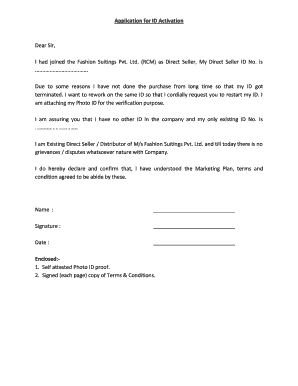
Get Rcm Id Activation
How it works
-

Open form follow the instructions
-

Easily sign the form with your finger
-

Send filled & signed form or save
How to fill out the Rcm Id Activation online
Filling out the Rcm Id Activation form is an essential step for users looking to reactivate their Direct Seller ID. This guide provides a step-by-step approach to ensure you complete the form accurately and efficiently.
Follow the steps to fill out the Rcm Id Activation form online
- Press the ‘Get Form’ button to access the form and open it in your preferred editing tool.
- Provide your Direct Seller ID Number in the designated field. This number is crucial for verifying your identity and linking your request to the correct account.
- In the section requesting a reason for reactivation, explain why you have not made purchases recently, ensuring clarity and honesty.
- Attach a self-attested Photo ID as evidence of your identity. Ensure that the photo ID is clear and legible.
- Sign and date the document in the specified areas to confirm your understanding of the terms and conditions.
- Review the completed form for accuracy. Ensure all required fields are filled out and that your attachments are included.
- Once you are satisfied with the form, you can either save the changes, download a copy for your records, print it, or share it as instructed.
Complete your Rcm Id Activation form online today for a seamless reactivation process.
Related links form
There is no charge/fee for registration as an immediate Seller.
Industry-leading security and compliance
US Legal Forms protects your data by complying with industry-specific security standards.
-
In businnes since 199725+ years providing professional legal documents.
-
Accredited businessGuarantees that a business meets BBB accreditation standards in the US and Canada.
-
Secured by BraintreeValidated Level 1 PCI DSS compliant payment gateway that accepts most major credit and debit card brands from across the globe.