Loading
Get Phone Repair Receipt
How it works
-

Open form follow the instructions
-

Easily sign the form with your finger
-

Send filled & signed form or save
How to fill out the Phone Repair Receipt online
Filling out a phone repair receipt online is a straightforward process that helps ensure clear communication between service providers and their customers. This guide provides detailed instructions on how to accurately complete each section of the receipt to maintain professionalism and transparency.
Follow the steps to complete your Phone Repair Receipt accurately.
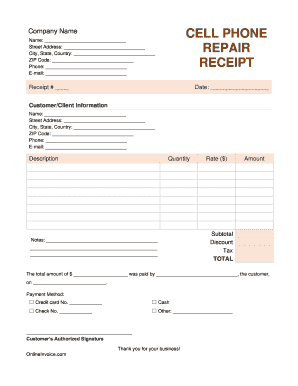
- Click ‘Get Form’ button to obtain the form and open it for editing.
- Begin by entering the company name at the top of the form. This identifies who is providing the repair service.
- Fill out the 'Name' field with the customer's full name followed by their street address, city, state, country, and ZIP code. This information is essential for proper identification and records.
- Next, input the customer's phone number and email address. These will be used for communication regarding the repair status.
- Enter the receipt number in the specified field. This unique identifier helps in tracking the transaction.
- Record the date of the transaction. This is important for keeping accurate records.
- In the 'Customer/Client Information' section, repeat the same information as the customer details to ensure clarity and correctness.
- Use the 'Description' field to list the services rendered or repairs made. Provide a brief but detailed account of the work conducted.
- Indicate the quantity of each service or item provided in the corresponding field.
- Next, enter the rate for each repair or service in the 'Rate ($)' field followed by the total 'Amount' for each entry.
- Calculate the subtotal by adding all amounts, then apply any discounts in the 'Discount' section followed by the applicable tax in the 'Tax' section.
- The 'TOTAL' section should reflect the final amount due after applying discounts and taxes.
- In the payment section, indicate the total amount paid and the payment method selected, whether it be credit card, cash, check, or other.
- Have the customer provide an authorized signature in the designated area to confirm acceptance of the charges and services rendered.
- Once all fields are completed, save your changes, download, print, or share the form as needed.
Complete your Phone Repair Receipt online today for efficient documentation and professional service.
The Top 10 Qualities to Seek in an iPhone/Android Phone Repair Company Speed of repair services provided. ... Ability to provide an accurate diagnosis quickly. ... Experience with a wide range of repair services. ... Affordability of services offered. ... Highly skilled repair technicians. ... Convenience of service.