Loading
Get Natwest Nwb50056
How it works
-

Open form follow the instructions
-

Easily sign the form with your finger
-

Send filled & signed form or save
How to fill out the Natwest Nwb50056 online
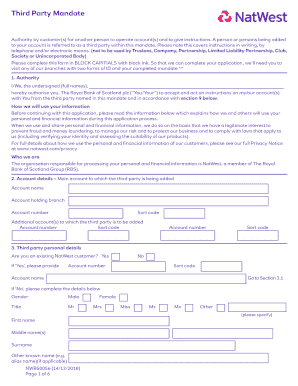
The Natwest Nwb50056 is a third-party mandate form that allows individuals to authorize another person to operate their bank account. This guide provides clear, step-by-step instructions on how to complete the form online, ensuring a smooth and efficient process.
Follow the steps to effectively complete the Natwest Nwb50056 form.
- Click ‘Get Form’ button to obtain the Natwest Nwb50056 form and open it in the editor.
- In Section 1, provide the full names of the individuals authorizing the mandate. Ensure that this information is accurately presented in block capitals.
- In Section 2, input the main account details where the third party will be added. This includes the account name, branch, account number, and sort code.
- Continue to Section 3, where you must fill out the personal details of the third party, including whether they are an existing Natwest customer. If they are not, provide their gender, name, address, and contact information.
- Complete Section 3.1 with regulatory details about the third party, including their nationality, tax information, and residency status.
- In Section 4, specify if the third party would like additional account features like a debit/ATM card. Clearly indicate the desired functionalities for each account listed.
- Review and confirm your agreement in Section 5, which includes acknowledging how your information will be used and shared.
- In Section 8, the third party must sign and date the form to confirm their addition to the account.
- If the account involved is a joint account, Section 9 requires signatures from all account holders, acknowledging the terms regarding the third party.
- Once all sections are completed, save the changes, download, print, or share the filled form as necessary.
Complete your Natwest Nwb50056 form online now to ensure smooth account management.