Loading
Form preview
  • US Legal Forms
  • Form Library
  • More Forms
  • More Multi-State Forms
  • Pid Application Form

Get Pid Application Form

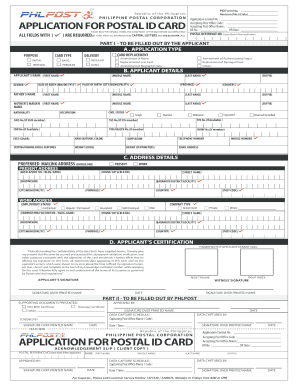
No.) (Date) P H I L I P P I N E P O S TA L C O R P O R AT I O N Accepting Post Office Name : Form No. Application OR No : Control No. :PID OR Date : PLEASE READ THE GENERAL TERMS AND CONDITIONS AT THE BACKh e P h i l i p p i n e s R e p u b l i c o f t BEFORE ACCOMPLISHING Accepting Post Office Code : Revision (No.) (Date) POSTAL NO. THIS ALL FIELDS WITH ( ) ARE REQUIRED. FORM.H I LALLP P I N E IN CAPITAL LETTERSR PUSE R ATINKO N Form No.REFERENCEName(Leave blank if New Application) PID Applicat.

How it works

  1. Open form

    Open form follow the instructions

  2. Easily sign form

    Easily sign the form with your finger

  3. Share form

    Send filled & signed form or save

How to fill out the Pid Application Form online

Filling out the Pid Application Form online can streamline your application process. This guide provides clear, step-by-step instructions to help you submit your application accurately and efficiently.

Follow the steps to complete your Pid Application Form online

  1. Click 'Get Form' button to access the Pid Application Form and open it in your preferred online editor.
  2. Identify the application type at the top section and select one of the options provided: New Application, Renewal, or Replacement. Make sure to choose the option that best fits your needs.
  3. In the 'Applicant Details' section, enter your information in capital letters using black ink. This includes your first name, middle name, and last name.
  4. Provide detailed information about your birth, including the date of birth, place of birth, and nationality. Be sure to fill in each field as required.
  5. Fill out the fields regarding your parent's names, civil status, and occupation. These details are essential for the application's verification process.
  6. In the 'Address Details' section, indicate your present address, including house number, street name, and postal code. Ensure that the information is accurate for communication purposes.
  7. Complete the 'Contact Information' section with your mobile and telephone numbers, along with your email address. This information will help in processing your application efficiently.
  8. If you are applying for a card replacement, provide details about the lost or damaged card if applicable. Clearly indicate any amendments needed or other purposes for the application.
  9. Review all the information filled out in the form to ensure accuracy and completeness before submission.
  10. Once everything is verified, save your changes and choose to download, print, or share the form as needed.

Start filling out your Pid Application Form online today for a seamless experience!

Get form

Experience a faster way to fill out and sign forms on the web. Access the most extensive library of templates available.
Get form

Related content

Texas Commission on Law Enforcement - Texas.gov
This form is to be submitted only for the express purpose of having a personal...
Learn more
How to Apply for the Counselor Education...
1) Students must first apply for the PID Grant via the Winona State University Counselor...
Learn more
Applications Guide PID Control - Trane
In an HVAC system, the controller uses a PID calculation to change the output of...
Learn more

Related links form

Convatec Inc Tracy White Form Mc Dean W2 Form Vendor Qualification Form Dbve

Questions & Answers

Get answers to your most pressing questions about US Legal Forms API.

Contact support

Follow these steps to fill out your next job application properly: Read the application before filling it out. Take your time. Answer completely and truthfully. Include your resume. Fill out job information chronologically. Put in the extra effort. Research your salary.

How much is the postal ID fee? The total postal ID fee, whether for first-time or renewal applications, is ₱504 (₱450 postal ID card and delivery fee + ₱54 for 12% VAT). If you need this ID card sooner, the rush postal ID application fee is ₱650.

The Postal ID (PID) is an identity card issued by the state-owned Philippine Postal Corporation. It is a valid identification document for use by Filipino citizens in availing themselves of various government services and transactions as well as in banking and other financial institutions.

Application forms are available in all post offices or you may download it here. Step 2. Upon approval of your requirements, proceed to the nearest ID capture station (see full list of capture stations on WHERE TO APPLY Page) where you will be digitally photographed and fingerprinted.

Two (2) copies of duly-accomplished application form. PROOF OF IDENTITY. a. Passport – must be valid for at least six (6) months prior to application. ... PROOF OF ADDRESS - Submit any one (1) of the following: Barangay Certificate of Residency – issued within three (3) months prior to PID application.

Register for a Personal Identification (PID) Number.

Go to the nearest Philpost office in your city/municipality and ask for a copy of the Postal ID Application Form, you may also download one from the link provided under 'Required Documents' section. Submit your application form, together with the requirements and payment, in ANY POST OFFICE.

Get This Form Now!

Use professional pre-built templates to fill in and sign documents online faster. Get access to thousands of forms.
Get form
If you believe that this page should be taken down, please follow our DMCA take down processhere.

Industry-leading security and compliance

US Legal Forms protects your data by complying with industry-specific security standards.
  • In businnes since 1997
    25+ years providing professional legal documents.
  • Accredited business
    Guarantees that a business meets BBB accreditation standards in the US and Canada.
  • Secured by Braintree
    Validated Level 1 PCI DSS compliant payment gateway that accepts most major credit and debit card brands from across the globe.
Get Pid Application Form
Get form
  • Adoption
  • Bankruptcy
  • Contractors
  • Divorce
  • Home Sales
  • Employment
  • Identity Theft
  • Incorporation
  • Landlord Tenant
  • Living Trust
  • Name Change
  • Personal Planning
  • Small Business
  • Wills & Estates
  • Packages A-Z
  • Affidavits
  • Bankruptcy
  • Bill of Sale
  • Corporate - LLC
  • Divorce
  • Employment
  • Identity Theft
  • Internet Technology
  • Landlord Tenant
  • Living Wills
  • Name Change
  • Power of Attorney
  • Real Estate
  • Small Estates
  • Wills
  • All Forms
  • Forms A-Z
  • Form Library
  • Legal Hub
  • About Us
  • Help Portal
  • Legal Resources
  • Blog
  • Affiliates
  • Contact Us
  • Delete My Account
  • Site Map
  • Industries
  • Forms in Spanish
  • Localized Forms
  • State-specific Forms
  • Forms Kit
  • Real Estate Handbook
  • All Guides
  • Notarize
  • Incorporation services
  • For Consumers
  • For Small Business
  • For Attorneys
  • USLegal
  • FormsPass
  • pdfFiller
  • signNow
  • altaFlow
  • DocHub
  • Instapage
Form Packages
  • Adoption
  • Bankruptcy
  • Contractors
  • Divorce
  • Home Sales
  • Employment
  • Identity Theft
  • Incorporation
  • Landlord Tenant
  • Living Trust
  • Name Change
  • Personal Planning
  • Small Business
  • Wills & Estates
  • Packages A-Z
Form Categories
  • Affidavits
  • Bankruptcy
  • Bill of Sale
  • Corporate - LLC
  • Divorce
  • Employment
  • Identity Theft
  • Internet Technology
  • Landlord Tenant
  • Living Wills
  • Name Change
  • Power of Attorney
  • Real Estate
  • Small Estates
  • Wills
  • All Forms
  • Forms A-Z
  • Form Library
Customer Service
  • Legal Hub
  • About Us
  • Help Portal
  • Legal Resources
  • Blog
  • Affiliates
  • Contact Us
  • Delete My Account
  • Site Map
  • Industries
  • Forms in Spanish
  • Localized Forms
  • State-specific Forms
  • Forms Kit
Legal Guides
  • Real Estate Handbook
  • All Guides
Prepared for you
  • Notarize
  • Incorporation services
Our Customers
  • For Consumers
  • For Small Business
  • For Attorneys
Our Sites
  • USLegal
  • FormsPass
  • pdfFiller
  • signNow
  • altaFlow
  • DocHub
  • Instapage
Social Media
Call us now toll free:
+1 833 426 79 33
As seen in:
© Copyright 1999-2026 airSlate Legal Forms, Inc. 3720 Flowood Dr, Flowood, Mississippi 39232
  • Your Privacy Choices
  • Terms of Service
  • Privacy Notice
  • Content Takedown Policy
  • Bug Bounty Program