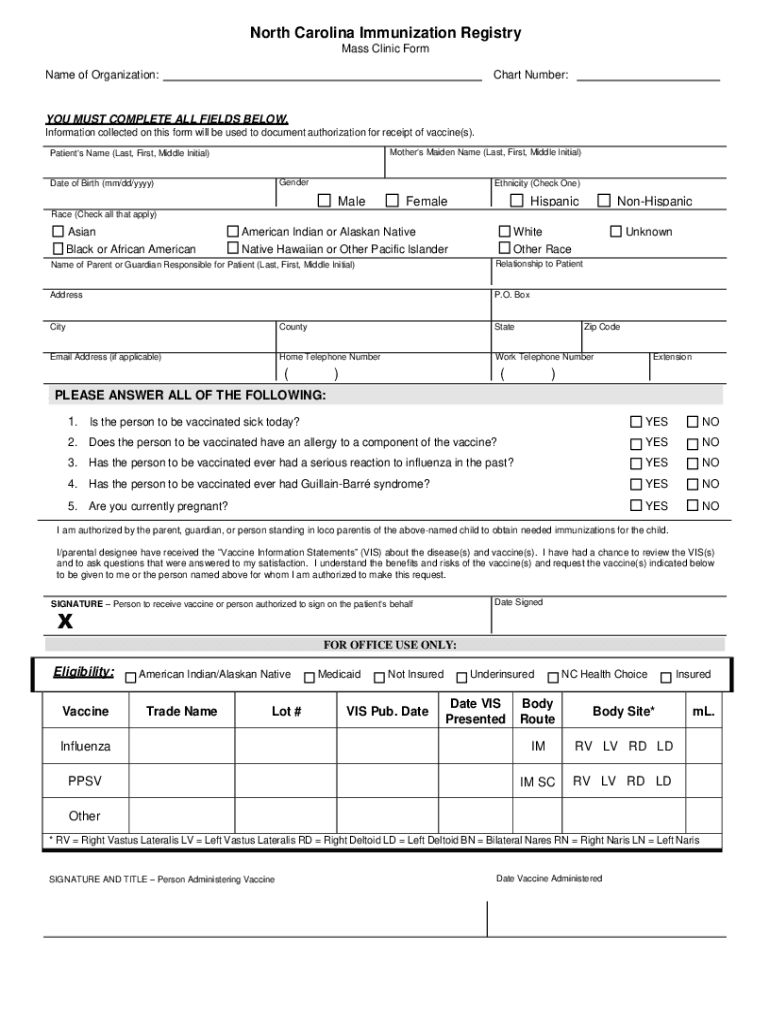
North Carolina Immunization Registry Mass Clinic Form Name of Organization:Chart Number:YOU MUST COMPLETE ALL FIELDS BELOW. Information collected on this form will be used to document authorization.

Open form follow the instructions

Easily sign the form with your finger

Send filled & signed form or save
How to fill out the NC Immunization Registry Mass Clinic Form online
Filling out the NC Immunization Registry Mass Clinic Form online is an important process for individuals seeking vaccinations. This guide provides step-by-step instructions to help users complete the form accurately and efficiently.
Follow the steps to complete the form successfully.
- Click ‘Get Form’ button to obtain the form and open it for editing.
- Enter the name of the organization in the field designated for that information.
- Fill in the chart number, ensuring that it is accurate and up-to-date.
- Complete all fields below, starting with the mother's maiden name (last, first, middle initial).
- Provide the patient's name in the specified format, including last, first, and middle initial.
- Select the gender of the patient by checking the appropriate box.
- Input the patient's date of birth using the format mm/dd/yyyy.
- Indicate the ethnicity of the patient by checking one of the options provided.
- Check all applicable races of the patient from the given list.
- Enter the name of the parent or guardian responsible for the patient, using last, first, and middle initial.
- Specify the relationship of the parent or guardian to the patient.
- Fill in the address, including city, county, state, and zip code.
- If applicable, provide an email address for further communication.
- Enter the home and work telephone numbers, including any extensions if necessary.
- Answer the health-related questions regarding vaccination eligibility with 'Yes' or 'No.'
- Confirm authorization by signing the form where indicated, along with the date signed.
- For office use only, if applicable, provide information on eligibility and vaccine details.
- Finally, ensure all sections are complete, then save changes, download, print, or share the form as needed.
Complete your vaccination documentation online today to ensure you or your loved ones receive the necessary immunizations.
Experience a faster way to fill out and sign forms on the web. Access the most extensive library of templates available.
Related content
Information collected on this form will be used to document authorization for receipt of...
The record of these immunizations must be signed by a health care professional or have the...
A medical record review was then conducted to better understand the reasons for...
Get answers to your most pressing questions about US Legal Forms API.
How do I contact Simon DHEC?
SIMON questions: DHEC Immunization Division IIS Unit at simon@dhec.sc.gov or 800-277-4687, option 3.
How to obtain a immunization record from North Carolina?
Phone: 1-877-873-6247. Fax: 1-800-544-3058. Email: ncirhelp@dhhs.nc.gov. Immunization Inquiry – Recipients.
How can I obtain a South Carolina Certificate of Religious Exemption?
The South Carolina Certificate of Religious Exemption may only be obtained at a county public health department. Forms cannot be e-mailed or mailed. Religious exemptions are only available for those attending childcare facilities and K-12 schools.
How to register for vaccine in South Carolina?
Vaccine Locator All South Carolinians age 6 months and older can now get the COVID-19 vaccine. We advise that you call providers to make sure that they have appointment availability before visiting. Need assistance? Call 1-855-472-3432 for help with COVID-19 vaccine questions and provider information.
How to upload immunization record to University of South Carolina?
Required Immunizations You must enter and upload your immunization records to your MyHealthSpace account at sc.edu/myhealthspace. Login is your UofSC network username and password, plus your date of birth. Once logged in, visit the "Medical Clearances" portion and click on "Immunizations Record".
How do I access Ncir?
Go to: https://ncir.ncdhhs.gov/ 2. Enter your username and password and click Login.
How to get a South Carolina Certificate of immunization?
The SC Certificate of Immunization can be obtained from your local health department, most health care providers, and some school nurses. You will need to provide your child's current immunization record for the certificate to be completed. Contact your local county health department for more information.
Use professional pre-built templates to fill in and sign documents online faster. Get access to thousands of forms.
If you believe that this page should be taken down, please follow our DMCA take down process here.