Loading
Get Mo 500-3222 2018-2026
How it works
-

Open form follow the instructions
-

Easily sign the form with your finger
-

Send filled & signed form or save
How to fill out the MO 500-3222 online
Filling out the MO 500-3222 form online is a straightforward process that allows educational institutions to document completed building activities. This guide will provide you with step-by-step instructions to ensure that you complete the form accurately and efficiently.
Follow the steps to complete the MO 500-3222 form online.
- Press the ‘Get Form’ button to access the form and launch it in the provided editor.
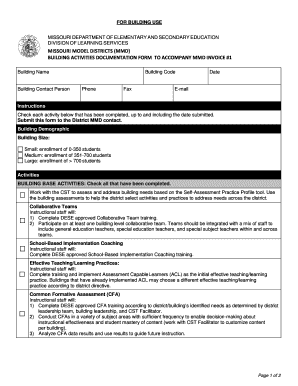
- Begin by entering the building name in the designated field, ensuring it is spelled correctly for accurate identification.
- Fill in the building contact person's name and provide their contact information, including phone and fax numbers along with an email address.
- Select the building code from the given list or enter it if it is not predefined.
- Specify the date of submission to document when the activities were reported.
- In the Building Demographic section, indicate the building size by checking one of the options: Small, Medium, or Large based on the student enrollment numbers.
- Proceed to check each completed activity listed under the BUILDING BASE ACTIVITIES. Be thorough, as this reflects the engagement in collaborative teams, implementation coaching, and more.
- Continue to the BUILDING VALUE-ADDED ACTIVITIES section, where you similarly check off completed activities, ensuring accuracy in documenting collaborative efforts and effectiveness in teaching practices.
- Once all relevant sections are completed, review the form for any errors or omissions.
- Complete the certification by having the principal sign and date the form to attest to the accuracy of the listed activities.
- Finally, save your changes, download a copy for your records, print the form, or share it with your district MMD contact as needed.
Get started on filling out the MO 500-3222 online now!