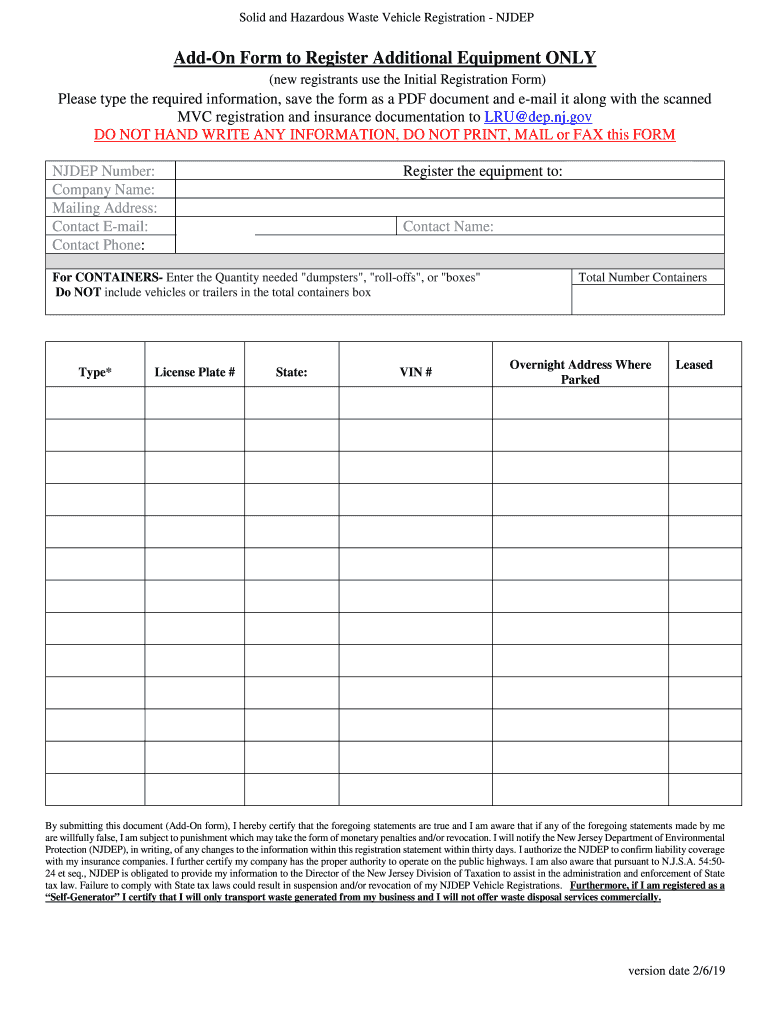
Solid and Hazardous Waste Vehicle Registration NJDEPInstructions for Existing Registrants to Register Additional Equipment (Andon Form) To register additional equipment only, please do the following.
Loading

Open form follow the instructions

Easily sign the form with your finger

Send filled & signed form or save
How to fill out the NJ Add-On Form To Register Additional Equipment Only online
Filling out the NJ Add-On Form To Register Additional Equipment Only is a vital step for users who need to register new equipment under their existing solid and hazardous waste vehicle registration. This guide provides clear, step-by-step instructions to assist you in completing the form accurately and efficiently.
Follow the steps to complete your registration online.
- Press the ‘Get Form’ button to obtain the form and open it in the editor.
- Ensure that you complete all required fields on the form, including your NJDEP number, company name, mailing address, contact email, and contact phone. This information is crucial for accurate processing.
- Register the equipment to a contact person by filling in their name as required.
- For containers such as dumpsters or roll-offs, specify the quantity needed. Do not include vehicles or trailers in this total.
- Input the type of equipment, license plate number, state of registration, and VIN number for each item being registered. Make sure all entries are typed, as handwritten information will not be accepted.
- Indicate the overnight address where the equipment is parked and whether the equipment is leased.
- Review the certification statement at the end of the form. By submitting the form, you affirm that your provided information is true. Ensure you acknowledge the legal implications of providing false information.
- Save the filled-out form as a PDF document. You must also scan the Motor Vehicle Commission registration and insurance documentation for each piece of new equipment you wish to register.
- E-mail the completed PDF form along with the scanned documentation to LRU@dep.nj.gov. Ensure that no other NJDEP staff are copied in this email.
- Await confirmation emails for receipt and processing. This may include billing information and payment instructions to complete your registration.
Complete your forms online to ensure timely processing and adherence to regulations.
Experience a faster way to fill out and sign forms on the web. Access the most extensive library of templates available.
Related content
Feb 6, 2019 — To register additional equipment only, please do the following (new...
CLIENT REGISTRATION. 847 ROEBLING AVENUE. TRENTON, NJ 08611. A. Please indicate the reason...
Register with the New Jersey Division of Taxation;. ♢. Collect, report and remit tax on...
Get answers to your most pressing questions about US Legal Forms API.
What is the NJDEP universal waste rule?
The Universal Waste Rule permits certain hazardous wastes known as "Universal Wastes" to be managed under streamlined requirements that will encourage the collection, recycling or disposal of these wastes.
What is NJ DEP A 901 exempt?
The New Jersey Department of Environmental Protection (DEP) permits an exemption for applying for A-901 licensure to individuals or companies that generate waste as part of the day to day operations of their business and are referred to as Self Generators.
How do I renew my NJDEP waste transporter decals?
The DEP will send notification e-mails to each waste transporter with information on the upcoming renewal cycle. What should I do? Go to the Licensing & Registration online renewal web page at http://.nj.gov/dep/dshw/hwr/regislic/lru.htm, and follow the links to the online renewal service.
What is the purpose of NJDEP?
The DEP plays a major role in strengthening communities by reducing environmental burdens, working with partners to support new economic opportunities and improving the day-to-day life for all, especially vulnerable populations.
How long does it take to get an a901 license in NJ?
This first step in the process (the A-901) can take a significant period of time, and averages about a year, though it certainly can take several months less or more. Then, the waste hauler needs to complete a CPCN (Certificate of Public Convenience and Necessity) application.
What is NJ a901 statute?
The Department of Environmental Protection (DEP) requires ALL solid, medical and hazardous waste transporters to register with the DEP prior to picking up, transporting or disposing of waste in New Jersey.
How do I register with NJDEP?
Important: Please DO NOT close your browser window prior to completing the registration process! Step 1: Request Access to NJDEP Online. Step 2: Link Your NJDEP Online Service to Your myNewJersey Account. Step 3: Use NJDEP Online.
What is Njdep registration?
The Department of Environmental Protection (NJDEP) requires solid waste transporters to register with the NJDEP and obtain vehicle decals prior to picking up or disposing of waste in New Jersey (references: N.J.S.A. 13:1E-1 et. seq., N.J.A.C. 7:26-3.2 and N.J.A.C.
Use professional pre-built templates to fill in and sign documents online faster. Get access to thousands of forms.
If you believe that this page should be taken down, please follow our DMCA take down process here.