Loading
Get Ca Acalanes Union High School District Intradistrict Transfer Request 2019-2026
How it works
-

Open form follow the instructions
-

Easily sign the form with your finger
-

Send filled & signed form or save
How to fill out the CA Acalanes Union High School District Intradistrict Transfer Request online
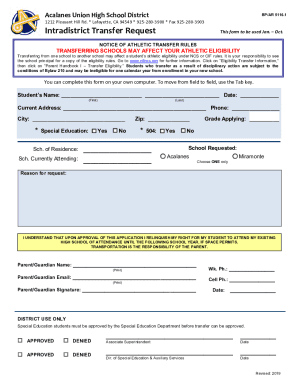
Completing the CA Acalanes Union High School District Intradistrict Transfer Request form is an essential step for families seeking to transfer their students within the district. This guide provides clear and detailed instructions to help you fill out the form accurately and efficiently.
Follow the steps to submit your transfer request.
- Press the ‘Get Form’ button to obtain the form and open it in your browser.
- Fill in the student's name, including their first and last name, in the designated fields.
- Enter the current address of the student, along with the phone number, city, and zip code.
- Indicate whether the student is receiving special education services by checking ‘Yes’ or ‘No’.
- Identify the school of residence and the school currently attending by entering this information in the respective fields.
- Specify the grade for which you are applying and select the requested school from the options provided (Acalanes or Miramonte).
- Provide a reason for the transfer request in the designated section.
- Read and acknowledge the statement regarding the relinquishment of the right to attend the existing school and transportation responsibilities.
- Enter the parent or guardian's name, email, signature, and contact numbers.
- Review the form for any errors or missing information before submitting.
- After completing the form, save your changes, and download, print, or share the form as needed.
Complete your transfer request online today and ensure a smooth transition for your student.