Loading
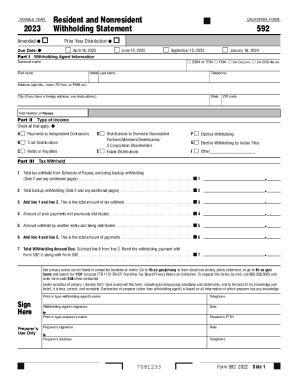
Get Ca Ftb 592 2023-2026
How it works
-

Open form follow the instructions
-

Easily sign the form with your finger
-

Send filled & signed form or save
How to fill out the CA FTB 592 online
The CA FTB 592 form is essential for reporting withholding taxes for various types of income in California. This guide provides clear instructions on how to fill out the form online, ensuring a smooth filing process.
Follow the steps to complete your CA FTB 592 form online.
- Click ‘Get Form’ button to obtain the form and open it in the editor.
- In Part I, start by entering the withholding agent information. Fill in the personal or business name, along with the appropriate identification number such as SSN, ITIN, FEIN, or CA Corp number.
- Continue with the contact details, including the address, city, state, and ZIP code. Ensure that all information is accurate to avoid delays.
- Next, move to Part II, where you will indicate the type of income being reported. Check all relevant boxes for the income types, such as payments to independent contractors, trust distributions, or rents.
- Proceed to Part III, where you will list partners, members, beneficiaries, or S corporation shareholders. Clearly identify each individual or entity receiving payments.
- In the tax withheld section, input the total amount of tax withheld from the schedule of payees. Include any backup withholding amounts in the appropriate fields.
- Complete the form by calculating the total withholding amount due. Ensure to subtract any prior payments from the total tax withheld.
- Finally, review all sections for accuracy, save your changes, and choose to download, print, or share the form as needed.
Complete your CA FTB 592 form online today to ensure compliance and timely submission.
In order to claim exemption from state income tax withholding, employees must submit a W-4 (PDF Format, 100KB)*. or DE-4 (PDF Format, 147KB)* certifying that they did not have any federal tax liability for the preceding year and that they do not anticipate any tax liability for the current taxable year.