Loading
Form preview
  • US Legal Forms
  • Form Library
  • Social Forms
  • Washington Social Forms
  • Wa Dshs 14-467 2016

Get Wa Dshs 14-467 2016

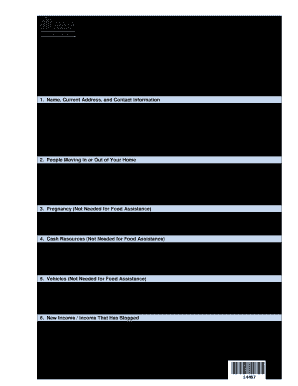
Rovide proof of all changes; and  Sign and return this review form. For Basic Food:  You do not need to answer questions 3, 4, 5 or 11.  If you receive Basic Food only, you’re not required to provide proof of income for this review. However, you can provide proof of a decrease in income for a possible increase in benefits.  Sign and return this review form. 1. Name, Current Address, and Contact Information FIRST NAME LAST NAME CLIENT IDENTIFICATION (ID) NUMBER STREET ADDRESS W.

How it works

  1. Open form

    Open form follow the instructions

  2. Easily sign form

    Easily sign the form with your finger

  3. Share form

    Send filled & signed form or save

How to fill out the WA DSHS 14-467 online

The WA DSHS 14-467 form is essential for individuals seeking to maintain their benefits. This guide provides clear, step-by-step instructions to assist users in effectively completing this form online, ensuring a seamless process.

Follow the steps to successfully complete your form.

  1. Click ‘Get Form’ button to access the WA DSHS 14-467 and launch it in your editor.
  2. Begin by filling in your name, current address, and contact information. Include your first name, last name, client identification number, and both your physical and mailing addresses.
  3. Address any people moving in or out of your home. Indicate whether anyone has moved in or out, provide their name, relationship to you, and the relevant dates.
  4. Complete the pregnancy section if applicable. Answer whether anyone in your household experienced a change in pregnancy in the past six months and provide the expected due date.
  5. For the cash resources section, report any cash resources possessed by anyone in your household. Provide details for checking, savings, stocks, and bonds.
  6. In the vehicles section, indicate if anyone acquired a vehicle recently. Supply details about the vehicle, such as owner, make, model, year, and current value.
  7. Discuss any new income or income that has ended in the past six months. Include the person's name, employer, and specify whether the income has started or stopped, along with the respective dates.
  8. For earnings or self-employment income, provide the name of the person with income, the employer, pay rate, employer's contact information, and the frequency of payments.
  9. Complete the child support section if there have been changes to an existing order. Provide the name of the person obligated to pay and the amount of support paid each month.
  10. Document income from other sources, listing the source, the person receiving it, and how much they receive weekly or monthly.
  11. Provide information about your monthly rent or mortgage costs and any associated taxes or mandatory fees, including amounts covered by others.
  12. List the utility costs that your household pays, marking which utilities are applicable and confirming if you received LIHEAA payments in the past year.
  13. Finally, review the form for accuracy and completeness. Then, sign and date the form affirming the truthfulness of the provided information.
  14. Once you have filled out all necessary sections, save your changes, and download, print, or share the completed form as needed.

Begin filling out your WA DSHS 14-467 online today to ensure you continue receiving your benefits.

Get form

Experience a faster way to fill out and sign forms on the web. Access the most extensive library of templates available.

Related content

Mid-Certification Review
DSHS 14-467 (REV. 08/2024). Mid-Certification Review. To keep getting benefits, you must...
Learn more

Related links form

Home Appraisal Checklist Pdf Elite Soccer Academy 2020 Indian Army Form 2020 Write Off Request Form - Nantucket MA 2020

Questions & Answers

Get answers to your most pressing questions about US Legal Forms API.

Contact support

In Washington state, individuals and families may qualify for public assistance based on income, household size, and specific needs. Generally, those who are low-income, elderly, disabled, or have dependent children are eligible. It's essential to review the WA DSHS 14-467 guidelines to understand your eligibility. Using tools from US Legal Forms can help clarify your situation and streamline your application process.

To report a change to your food stamp benefits, you can do so online via the DSHS portal or by phone. Ensure to provide all pertinent details to avoid any potential issues. The instructions provided in the WA DSHS 14-467 can help you navigate this process more easily.

To apply for medical and food stamps in Washington, start by completing the online application on the DSHS website. Alternatively, you can visit a local DSHS office to get assistance in person. For a clear understanding of the application process, the WA DSHS 14-467 is highly recommended.

Reporting changes to your food stamp case is straightforward. You can either visit the DSHS website or contact your local office to notify them of the changes. It’s important to act promptly to avoid disruptions in your assistance. Refer to the WA DSHS 14-467 for a guide on the steps to take.

The monthly income limit for food stamps in Washington is determined by household size and is updated annually. Generally, if your household income falls below the Federal Poverty Level, you may qualify. For specifics regarding eligibility, the WA DSHS 14-467 can be a useful tool.

To apply for DSHS benefits in Washington, you can complete an application online, by mail, or in person at your local DSHS office. Ensure you have all necessary documents ready for submission, as this will aid in a smoother process. The WA DSHS 14-467 form can help clarify your application process and requirements.

Reporting changes to DSHS in Washington state can be done by contacting them directly via phone or online communication. Provide accurate information about the changes to avoid any complications. Utilizing the WA DSHS 14-467 form might assist in documenting these changes clearly and effectively.

To submit documents to DSHS in Washington State, choose a method that fits your needs—this could be via mail, fax, or an online platform. Make sure you prepare all necessary documents beforehand and confirm you have the correct submission information. Checking if you need the WA DSHS 14-467 form can be very helpful for ensuring completeness.

Submitting documents to DHS typically involves following the specific procedures outlined by your local office. You can usually do this online, through fax, or in person. It's wise to inquire about the WA DSHS 14-467 form to ensure you provide all necessary information during your submission.

You can submit documents to DSHS in Washington state either by mail, fax, or through their online submission system. Make sure your documents are complete and include any required identification details. Utilizing the WA DSHS 14-467 form may streamline your submission, so consider using it for increased clarity.

Get This Form Now!

Use professional pre-built templates to fill in and sign documents online faster. Get access to thousands of forms.
If you believe that this page should be taken down, please follow our DMCA take down processhere.
Get WA DSHS 14-467
  • Adoption
  • Bankruptcy
  • Contractors
  • Divorce
  • Home Sales
  • Employment
  • Identity Theft
  • Incorporation
  • Landlord Tenant
  • Living Trust
  • Name Change
  • Personal Planning
  • Small Business
  • Wills & Estates
  • Packages A-Z
  • Affidavits
  • Bankruptcy
  • Bill of Sale
  • Corporate - LLC
  • Divorce
  • Employment
  • Identity Theft
  • Internet Technology
  • Landlord Tenant
  • Living Wills
  • Name Change
  • Power of Attorney
  • Real Estate
  • Small Estates
  • Wills
  • All Forms
  • Forms A-Z
  • Form Library
  • Legal Hub
  • About Us
  • Help Portal
  • Legal Resources
  • Blog
  • Affiliates
  • Contact Us
  • Delete My Account
  • Site Map
  • Industries
  • Forms in Spanish
  • Localized Forms
  • State-specific Forms
  • Forms Kit
  • Real Estate Handbook
  • All Guides
  • Notarize
  • Incorporation services
  • For Consumers
  • For Small Business
  • For Attorneys
  • USLegal
  • FormsPass
  • pdfFiller
  • signNow
  • altaFlow
  • DocHub
  • Instapage
Form Packages
  • Adoption
  • Bankruptcy
  • Contractors
  • Divorce
  • Home Sales
  • Employment
  • Identity Theft
  • Incorporation
  • Landlord Tenant
  • Living Trust
  • Name Change
  • Personal Planning
  • Small Business
  • Wills & Estates
  • Packages A-Z
Form Categories
  • Affidavits
  • Bankruptcy
  • Bill of Sale
  • Corporate - LLC
  • Divorce
  • Employment
  • Identity Theft
  • Internet Technology
  • Landlord Tenant
  • Living Wills
  • Name Change
  • Power of Attorney
  • Real Estate
  • Small Estates
  • Wills
  • All Forms
  • Forms A-Z
  • Form Library
Customer Service
  • Legal Hub
  • About Us
  • Help Portal
  • Legal Resources
  • Blog
  • Affiliates
  • Contact Us
  • Delete My Account
  • Site Map
  • Industries
  • Forms in Spanish
  • Localized Forms
  • State-specific Forms
  • Forms Kit
Legal Guides
  • Real Estate Handbook
  • All Guides
Prepared for you
  • Notarize
  • Incorporation services
Our Customers
  • For Consumers
  • For Small Business
  • For Attorneys
Our Sites
  • USLegal
  • FormsPass
  • pdfFiller
  • signNow
  • altaFlow
  • DocHub
  • Instapage
Social Media
Call us now toll free:
+1 833 426 79 33
As seen in:
© Copyright 1999-2026 airSlate Legal Forms, Inc. 17 Station Street, Suite 303, Brookline, MA 02445
  • Your Privacy Choices
  • Terms of Service
  • Privacy Notice
  • Content Takedown Policy
  • Bug Bounty Program
WA DSHS 14-467
This form is available in several versions.
Select the version you need from the drop-down list below.
2020 WA DSHS 14-467
Select form
  • 2020 WA DSHS 14-467
  • 2018 WA DSHS 14-467
  • 2016 WA DSHS 14-467
  • 2014 WA DSHS 14-467
  • 2013 WA DSHS 14-467
Select form