Loading
Get Mo 300-1590 2018
How it works
-

Open form follow the instructions
-

Easily sign the form with your finger
-

Send filled & signed form or save
How to fill out the MO 300-1590 online
Completing the MO 300-1590 form accurately is crucial for obtaining background screenings for caregivers. This guide will walk you through each section of the form to ensure that you filled it out correctly and efficiently.
Follow the steps to complete the MO 300-1590 form online.
- Click ‘Get Form’ button to access the form and open it in your selected editor.
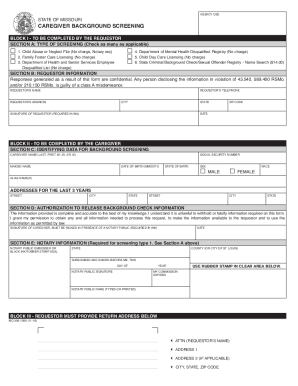
- In Block I, Section A, indicate the type of screening needed by checking all applicable options. Make sure to understand which screenings are free and which require payment.
- Complete Section B by entering the requestor’s information, including their name, telephone number, address, city, and state. Remember to include an ink signature and the date.
- Move to Block II, Section C, where the caregiver must provide their identifying data. This section requires information such as last name, first name, middle initial, and social security number.
- In Section D, the caregiver must authorize the release of their background check information by signing in the presence of a notary public. Ensure that all required options are selected during this process.
- If applicable, Section E will need to be completed by the notary public after witnessing the caregiver's signature.
- Finally, complete Block III by providing the return address for the completed form, including your name and any additional address details.
- Once all sections are complete, save your changes. You can then download, print, or share the form as needed.
Start filling out your documents online to ensure a timely and accurate background screening process.
Get form
Experience a faster way to fill out and sign forms on the web. Access the most extensive library of templates available.
Get This Form Now!
Use professional pre-built templates to fill in and sign documents online faster. Get access to thousands of forms.