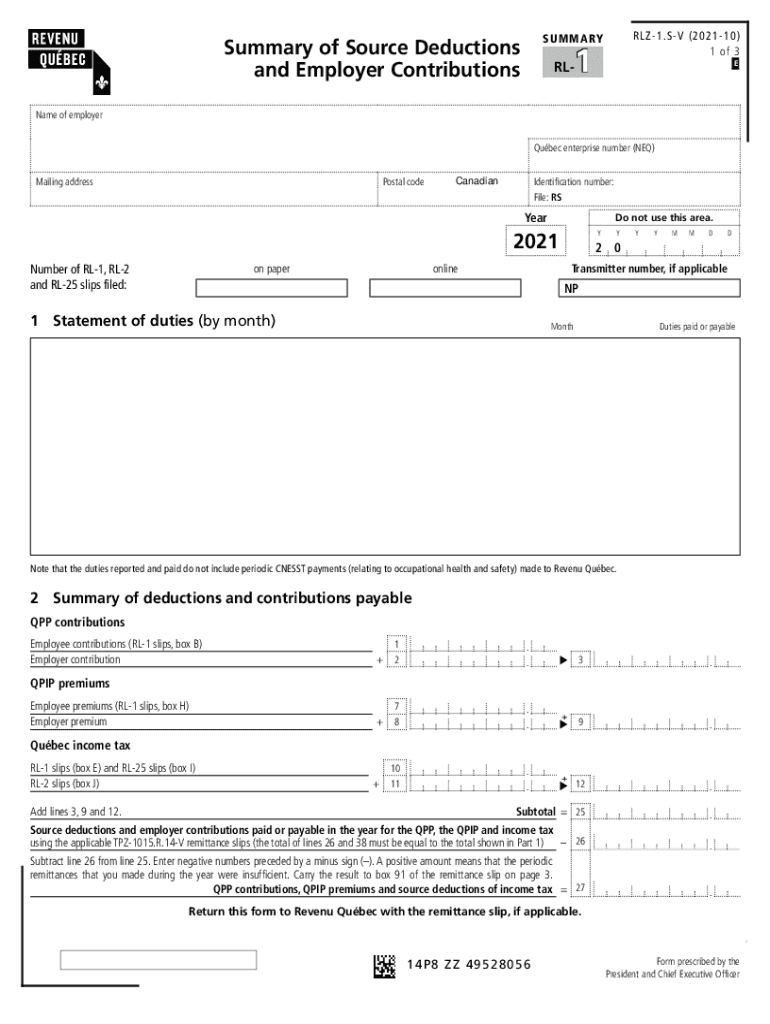
Navigation pointers NoticeR LZ1.SV ( 202110) 1 of 3S U M M A RYSummary of Source Deductions andEmployer Contributions1RLE4EraseFor information see page 3 of this form. Name of employer Qubec enterprise.

Open form follow the instructions

Easily sign the form with your finger

Send filled & signed form or save
How to fill out the CA RL-1 Summary online
The CA RL-1 Summary is an important document required for reporting source deductions and employer contributions in Quebec. This guide provides a comprehensive overview to help users complete the form accurately and efficiently online.
Follow the steps to fill out the CA RL-1 Summary seamlessly
- Click ‘Get Form’ button to obtain the CA RL-1 Summary and open it in your preferred format.
- Begin by entering the name of the employer and the Canadian enterprise number (NEQ) in the designated fields. Ensure that the mailing address and postal code are accurately filled out.
- In the identification number section, input the relevant identification details as instructed.
- Fill in the year pertaining to the summary as '2021' and specify the number of RL-1, RL-2, and RL-25 slips filed both on paper and online.
- Proceed to the statement of duties section. Report the duties paid or payable by month. Note that periodic CNESST payments are not included here.
- In the summary of deductions and contributions, detail the amounts for QPP contributions, QPIP premiums, and the Quebec income tax. Ensure that you add the specified lines and make any necessary calculations.
- Complete the section for contributions to the health services fund, including the contribution rate and eligible payroll amounts according to the guidelines provided.
- Provide additional calculations related to the Workforce Skills Development and Recognition Fund (WSDRF) and determine if there's a balance due or a refund.
- Finally, save your changes, and choose whether to download, print, or share the completed form as needed.
Complete your CA RL-1 Summary online today for a smooth filing process.
Experience a faster way to fill out and sign forms on the web. Access the most extensive library of templates available.
Related content
2.2.1 Short-term Station Blackout (STSBO) . ... Figure 3-14 Possible transitions in the 3...
SUFFEREO. DATA SUS. (SH1.1). 68K Gol Sok! Sake Son Goki Go Ski Säks ! IS ... RLZ. -. AL1...
Venus is a Roman goddess, whose functions encompassed love, beauty, desire, sex...
Use professional pre-built templates to fill in and sign documents online faster. Get access to thousands of forms.
If you believe that this page should be taken down, please follow our DMCA take down process here.
This form is available in several versions. Select the version you need from the drop-down list below.