1/31/2023WORK CAPACITY TEST RECORDAPPENDIX OAppendix O Work C apacity Test R ecord Units will document the administration of the WCT to all employees and job applicants. This documentation must be.

Open form follow the instructions

Easily sign the form with your finger

Send filled & signed form or save
How to fill out the NIFC Appendix O Work Capacity Test Record Form online
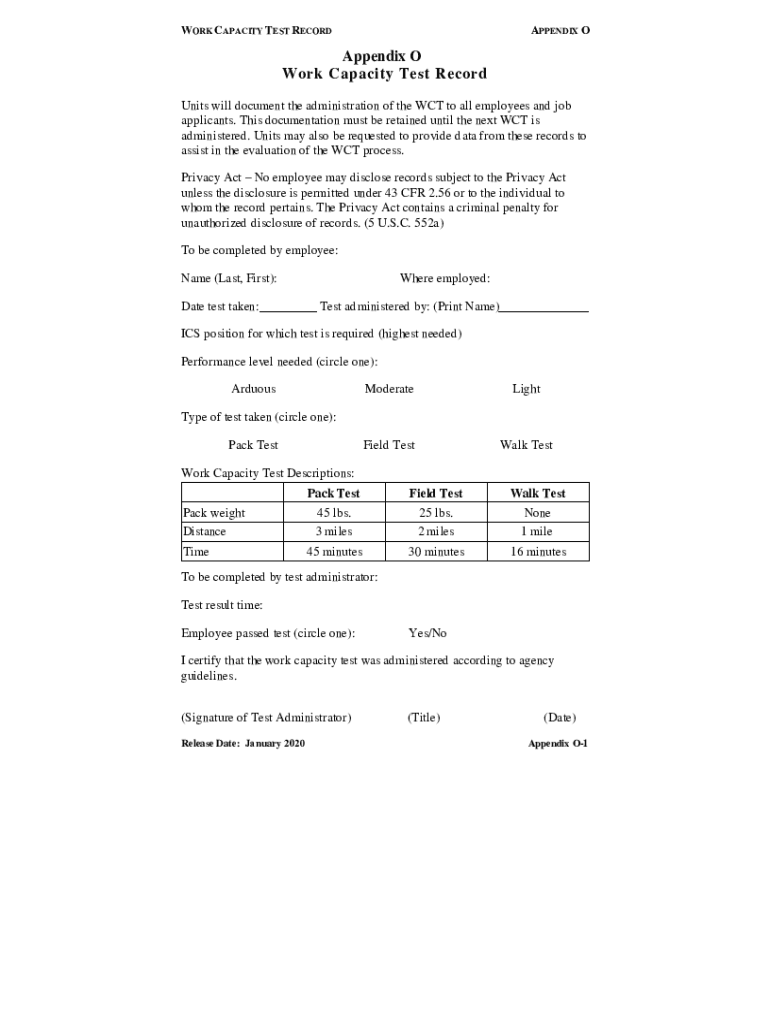
The NIFC Appendix O Work Capacity Test Record Form is essential for documenting the administration of the Work Capacity Test for employees and job applicants. This guide provides clear, step-by-step instructions to help users effectively complete the form online.
Follow the steps to accurately complete the form online.
- Click ‘Get Form’ button to access the document and have it open in your selected platform.
- Begin filling out the form by entering your name in the designated field labeled ‘Name (Last, First):’. Ensure that your name is spelled correctly.
- Next, indicate the date on which the test was taken by filling in the ‘Date test taken:’ section.
- In the ‘Where employed:’ section, provide the name of your current employer. This detail verifies your affiliation.
- Identify the name of the person who administered the test by completing the ‘Test administered by: (Print Name)’ field.
- Specify your ICS position that requires the test by writing it in the ‘ICS position for which test is required (highest needed)’ section.
- Indicate the required performance level by circling the appropriate option among Arduous, Moderate, or Light.
- Select the type of test taken by circling one of the options: Pack Test, Field Test, or Walk Test.
- Provide details regarding the Pack weight, distance, and time as reflected in the Work Capacity Test Descriptions provided in the document.
- Next, the test administrator will fill in the ‘Test result time:’ and circle the test result confirming if the employee passed the test (Yes/No).
- The test administrator should sign in the ‘Signature of Test Administrator’ field, ensuring to include their title and the date completed.
- After completing the form, save any changes made, and then download, print, or share the completed document as needed.
Complete your NIFC Appendix O Work Capacity Test Record Form online today to ensure your documentation is accurate and up-to-date.
Experience a faster way to fill out and sign forms on the web. Access the most extensive library of templates available.
Related content
Units will document the administration of the WCT to all employees and job applicants...
(appendix E) as soon as they receive medical clearance. ... Work Capacity Test Record...
A–1 v NFIRS 5.0 COMPLETE REFERENCE GUIDE TABLE OF CONTENTS Appendix B. ... How NFIRS...
Use professional pre-built templates to fill in and sign documents online faster. Get access to thousands of forms.
If you believe that this page should be taken down, please follow our DMCA take down process here.
This form is available in several versions. Select the version you need from the drop-down list below.