Loading
Get In Time Card Discrepancy Form - County Pulaski 2015
How it works
-

Open form follow the instructions
-

Easily sign the form with your finger
-

Send filled & signed form or save
How to fill out the IN Time Card Discrepancy Form - County Pulaski online
This guide provides a comprehensive and user-friendly approach to completing the IN Time Card Discrepancy Form for Pulaski County. Follow the instructions below to ensure your form is filled out correctly and efficiently.
Follow the steps to accurately complete your form.
- Press the ‘Get Form’ button to access the discrepancy form and open it in your editing tool.
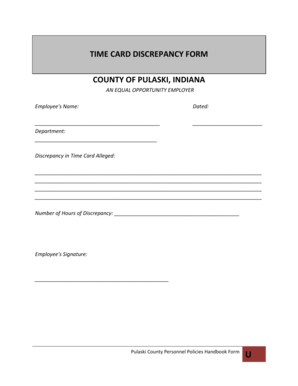
- Begin by entering your full name in the designated field labeled 'Employee's Name.' This identifies you as the individual reporting the discrepancy.
- Record the date of filing in the 'Dated' area. This helps establish the timeline for your request.
- Indicate your department in the corresponding section. Be precise to ensure your form is routed correctly.
- Describe the nature of the discrepancy clearly in the 'Discrepancy in Time Card Alleged' field. Provide as much detail as needed to fully explain the issue.
- Specify the 'Number of Hours of Discrepancy' in the appropriate field. Make sure this aligns with the details provided in the previous section.
- Sign the form in the 'Employee's Signature' section to validate your submission.
- Once you have filled out all necessary fields, you can save your changes, download the completed form, print it for your records, or share it as needed.
Complete your IN Time Card Discrepancy Form online today!
Get form
Experience a faster way to fill out and sign forms on the web. Access the most extensive library of templates available.
Get This Form Now!
Use professional pre-built templates to fill in and sign documents online faster. Get access to thousands of forms.