Loading
Get West Virginiainternal Revenue Service
How it works
-

Open form follow the instructions
-

Easily sign the form with your finger
-

Send filled & signed form or save
How to fill out the West Virginia Internal Revenue Service online
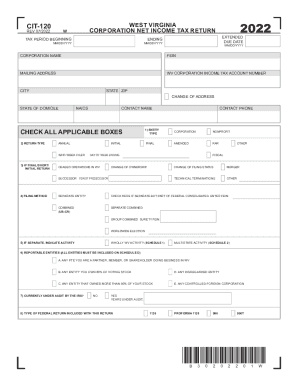
Filing the West Virginia Corporation Net Income Tax Return (CIT-120) online can streamline your tax preparation process and ensure accuracy. This guide provides step-by-step instructions on how to complete the form effectively, catering to users with varying levels of experience in tax filing.
Follow the steps to fill out the CIT-120 accurately.
- Click ‘Get Form’ button to access the CIT-120 and open it in the editor.
- Fill in the tax period details, including the beginning and ending dates. Ensure these dates are formatted in MM/DD/YYYY.
- Provide the corporation's name, Federal Employer Identification Number (FEIN), mailing address, and West Virginia Corporation Income Tax account number.
- Indicate your state of domicile and enter the NAICS code that corresponds with your primary business activity.
- Complete the contact details by entering a contact name and phone number for any inquiries regarding the return.
- Check all applicable boxes regarding your entity type and return type, such as Corporation, Nonprofit, Final, or Amended.
- If applicable, provide details regarding any short or final returns and indicate whether the corporation ceased operations in West Virginia.
- If the filing method includes a merger or change of filing status, ensure to mark the correct boxes.
- Report any entities that are required on Schedule D, including partnerships or entities you own more than 80% of.
- Complete the financial summary section by entering the adjusted corporate net income tax, prior year carryforward credit, estimated payments, and withholding amounts.
- Verify the total payments and calculate the overpayment or tax due, entering these figures as required.
- Select the direct deposit option for any refunds, providing the required banking information.
- Sign and date the return, including the preparer’s information if applicable.
- Finalize your return by saving changes, downloading, or printing the completed CIT-120.
Begin filing your West Virginia Corporation Net Income Tax Return online today for a smoother tax experience.
You must file a resident return and report all of your income in the same manner as any other resident individual unless you did not maintain a physical presence in West Virginia for more than 30 days during the taxable year.