Loading
Get Il Dor Il–1040 Schedule Nr 2022-2026
How it works
-

Open form follow the instructions
-

Easily sign the form with your finger
-

Send filled & signed form or save
How to use or fill out the IL DoR IL–1040 Schedule NR online
Filling out the IL DoR IL–1040 Schedule NR is essential for nonresidents and part-year residents to accurately report their Illinois tax obligations. This guide is designed to help users navigate the form easily and efficiently, whether they are familiar with tax forms or not.
Follow the steps to complete the IL DoR IL–1040 Schedule NR online.
- Press the ‘Get Form’ button to access the form and open it in your chosen online environment.
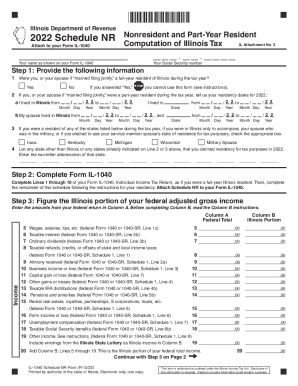
- Provide your name and Social Security number as they appear on your Form IL-1040.
- Indicate whether you or your spouse, if married filing jointly, were a full-year resident of Illinois during the tax year by selecting 'Yes' or 'No'. If 'Yes', note that this form cannot be used.
- If you or your spouse were a part-year resident, fill in your residency dates for 2022 in the provided format.
- List any other states where you claimed residency for tax purposes in 2022, using the two-letter state abbreviations.
- Complete Lines 1 through 10 of your Form IL-1040 as if you were a full-year resident, then proceed to fill in the remainder of Schedule NR based on your residency.
- Figure the Illinois portion of your federal adjusted gross income by entering amounts from your federal return into Column A and, as instructed, into Column B.
- Continue entering relevant adjustments to income in the specified columns, carefully following instructions for accuracy.
- Calculate your Illinois additions and subtractions based on your Form IL-1040 total.
- Finish the form by calculating your Illinois base income and tax. Enter the necessary calculations as directed.
- Once all sections are completed, review your form, then save changes, download, print, or share it as needed.
Complete your IL DoR IL–1040 Schedule NR online today for a seamless tax filing experience.