Loading
Get Ie Vat 58 2019
How it works
-

Open form follow the instructions
-

Easily sign the form with your finger
-

Send filled & signed form or save
How to fill out the IE VAT 58 online
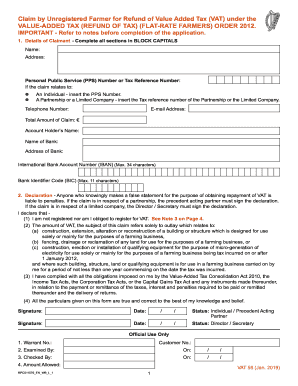
The IE VAT 58 form allows unregistered farmers to claim a refund of value-added tax (VAT) in a structured manner. This guide provides step-by-step instructions to ensure that users can complete the form accurately and efficiently.
Follow the steps to complete the form effectively.
- Press the ‘Get Form’ button to obtain the form and open it in the online editor.
- In the 'Details of Claimant' section, fill in all fields using BLOCK CAPITALS. Include your name, address, and whether you are an individual, a partnership, or a limited company, providing the appropriate Personal Public Service (PPS) Number or Tax Reference Number.
- Provide your telephone number and the total amount of the claim in euros.
- Fill in your bank details including the account holder’s name, bank name, address, email address, International Bank Account Number (IBAN), and Bank Identifier Code (BIC). Ensure accuracy as these details are necessary for processing your refund.
- In the 'Declaration' section, confirm that you are not registered for VAT and mark the box that applies to your claim. Your declaration indicates compliance with tax obligations, and it must be signed and dated by the claimant or the appropriate representative.
- Complete the 'Details of Claim' by entering the period of claim. Specify the start and end dates within the same calendar year.
- If applicable, provide details regarding farm buildings or structures, including a full description of work carried out, commencement and completion dates. Include checkboxes indicating the purpose of any related water supply or roadway.
- If claiming for fixed qualifying equipment, specify the type of equipment and its installation location.
- In the 'Breakdown of Amount Claimed' section, ensure to attach an original VAT invoice associated with the claim, indicating supplier details and total refundable VAT amount. Remember to exclude non-refundable items.
- Once all sections are completed, review the form for accuracy. You can then save changes, download, print, or share the form as necessary.
Start filling out the IE VAT 58 form online today to reclaim your VAT!
Get form
Experience a faster way to fill out and sign forms on the web. Access the most extensive library of templates available.
Yes, if you are self-employed, you can claim VAT back on business-related expenses. You must be VAT registered and keep thorough records of your transactions. Familiarizing yourself with the IE VAT 58 guidelines will aid in optimizing your claims and ensuring compliance with relevant regulations.
Get This Form Now!
Use professional pre-built templates to fill in and sign documents online faster. Get access to thousands of forms.