Loading
Get Ok Application For Absentee Ballot 2021-2026
How it works
-

Open form follow the instructions
-

Easily sign the form with your finger
-

Send filled & signed form or save
How to fill out the OK application for absentee ballot online
Completing the OK application for absentee ballot online allows users to participate in elections conveniently. This guide offers clear instructions on filling out the application accurately to ensure your absentee ballot is processed without issues.
Follow the steps to complete your absentee ballot application online.
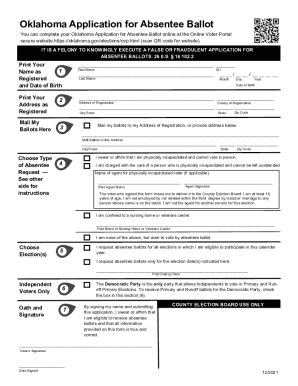
- Press the ‘Get Form’ button to access the OK application for absentee ballot and open it in your chosen editor.
- Enter your name as registered to vote and include your date of birth in the specified format: month, day, year.
- Provide your physical address as registered, ensuring you use a street or 911 address.
- If you wish for your ballots to be sent to a different address, check the designated box and input the new mailing address.
- If you are physically incapacitated and cannot vote in person, select the first checkbox. If you are appointing an agent to submit your application, they must sign and print their name.
- If you care for a person who is physically incapacitated, check the second box and have your agent's name and signature included.
- For voters in nursing homes or veterans centers, select the third box and provide the name of the facility.
- If you request a no-excuse absentee ballot, select the fourth option.
- Choose whether you want ballots for all eligible elections in the current calendar year or specify certain election dates.
- If you wish to receive a Democratic ballot for Primary and Runoff Primary elections, check the corresponding box.
- Carefully read the oath, then sign and date the application before submission.
- Submit your completed application by mail, email, fax, or in person to your County Election Board.
Complete your OK application for absentee ballot online today and ensure your vote is counted.