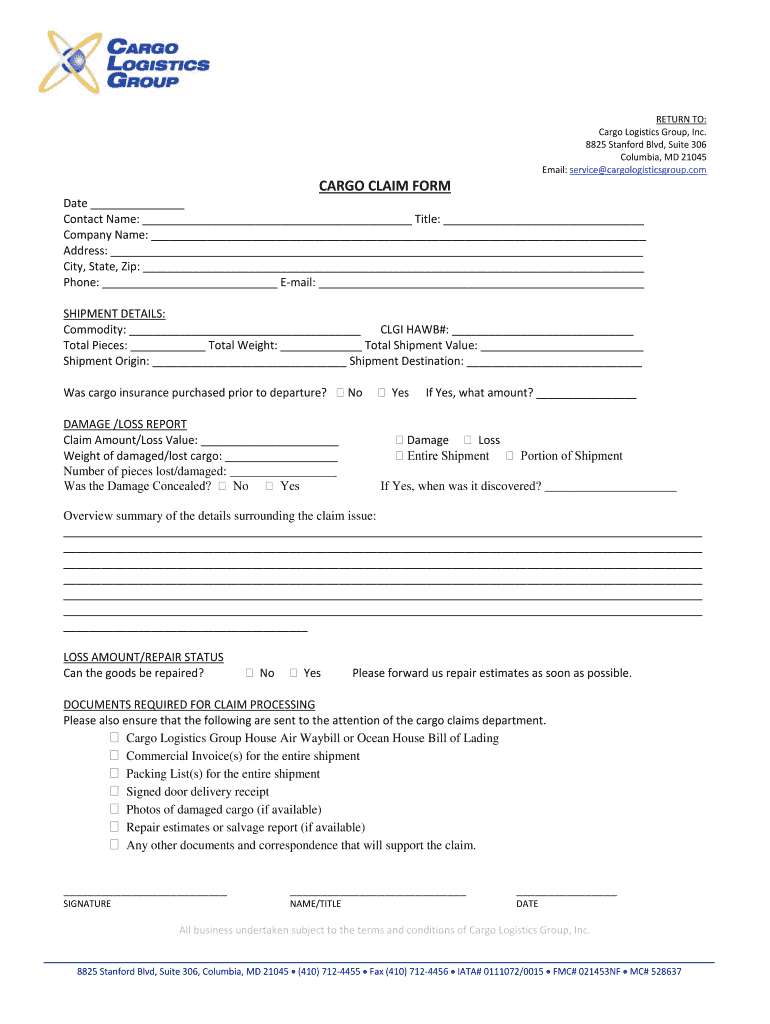
RETURN TO: Cargo Logistics Group, Inc. 8825 Stanford Blvd, Suite 306 Columbia, MD 21045 Email: service cargologisticsgroup. Chicago CLAIM Format Contact Name: Title: Company Name: Address: City, State,.
Loading

Open form follow the instructions

Easily sign the form with your finger

Send filled & signed form or save
How to fill out the MD Cargo Logistics Group Cargo Claim Form online
Filing a cargo claim can often be a complex process, but the MD Cargo Logistics Group Cargo Claim Form provides a clear structure to ensure you submit your claim effectively. This guide will assist you in filling out the required sections of the form online, facilitating a smoother claims experience.
Follow the steps to fill out your Cargo Claim Form online.
- Click 'Get Form' button to obtain the form and access it through your preferred editing platform.
- Begin by entering the date in the designated field at the top of the form. This is important for record-keeping purposes.
- Fill in your contact name and title in the provided fields. Accurate details help in the communication process.
- Input your company name, address, city, state, and zip code. This information is crucial for identifying the entity making the claim.
- Provide your phone number and email address to ensure the claims department can reach you for any follow-up needed.
- Under the shipment details section, specify the commodity type, CLGI HAWB number, total pieces, total weight, and total shipment value. This data is necessary for validating the claim.
- Indicate the shipment origin and destination accurately to help trace the cargo route.
- Specify whether cargo insurance was purchased prior to departure by checking the appropriate box.
- In the damage/loss report section, enter the claim amount or loss value, weight of damaged or lost cargo, and the number of pieces affected. This information is vital for processing your claim.
- Indicate whether damage was concealed by choosing 'Yes' or 'No.' If applicable, detail the amount and when the damage was discovered.
- Provide an overview summary detailing the circumstances surrounding the claim issue. Be as comprehensive as possible to support your claim.
- In the loss amount/repair status section, indicate whether the goods can be repaired and attach any repair estimates if applicable.
- Check off the required documents needed for claim processing to ensure your submission is complete.
- Complete the signature field with your name, title, and date to validate the claim. This step confirms that all information provided is accurate.
- Once all fields are completed, save changes, download, print, or share the completed form as needed.
Complete your MD Cargo Logistics Group Cargo Claim Form online today to expedite your claims process.
Experience a faster way to fill out and sign forms on the web. Access the most extensive library of templates available.
Related content
Carriers: If you would like to update the following ID/Operations information, please...
The purpose of this international scan was to investigate the issues, constraints...
Oct 1, 2018 — Shipper Certification: I hereby declare that the contents of this...
Get answers to your most pressing questions about US Legal Forms API.
How do I claim cargo?
Formal Claim A copy of the air waybill. If appropriate a copy of the House air waybill. Written notice of complaint submitted by the person entitled to delivery. Handling report from the carrier. Shipper's original invoice. Discount value invoice (in case of product depreciation) Packing List.
How do I claim lost cargo?
Claims should be addressed to the carrier's claims manager at the carrier's home office, not to the carrier's insurance company. If a broker is involved, you must still file the claim with the carrier, but you should also send a copy to the broker.
How long does a shipper have to file a cargo claim?
Filing Cargo Claims (49 U.S.C. The Carmack Amendment only states that a motor carrier cannot require cargo claims to be filed in less than 9 months. So, if the Bill of Lading states that cargo claims must be filed within 6 months, then that provision is unenforceable.
How does a cargo claim work?
A freight claim is a demand for reimbursement from the carrier when shippers are overcharged or face losses due to damaged packages. A signed agreement between the carrier and shipper should identify liability details, and what types of claims can be filed.
What is needed to file a cargo claim?
There are four essential elements to filing a freight claim: The shipment must be identified so the carrier can complete an investigation. The type of loss or damage must be stated. The amount for the claim must be stated. A demand for payment by the carrier must be included.
What is cargo logistic?
Cargo logistics apply to the process of handling your cargo, inspecting it, and following it along on its journey from point A to its final destination. Using organized cargo and logistics protocols allow your carrier to ensure safe transportation for your shipment.
Use professional pre-built templates to fill in and sign documents online faster. Get access to thousands of forms.
If you believe that this page should be taken down, please follow our DMCA take down process here.