Loading
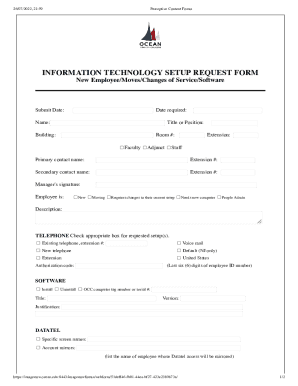
Get Ocean County College Information Technology Setup Request Form 2022-2026
How it works
-

Open form follow the instructions
-

Easily sign the form with your finger
-

Send filled & signed form or save
How to fill out the Ocean County College Information Technology Setup Request Form online
This guide provides a comprehensive overview of how to complete the Ocean County College Information Technology Setup Request Form online. By following the steps outlined below, users can efficiently provide all necessary information for their IT setup needs.
Follow the steps to complete the form accurately and effectively.
- Press the ‘Get Form’ button to access the form and open it in your preferred online editing tool.
- Begin by entering the submit date and the date on which the setup is required. This information helps the IT department prioritize requests.
- Fill in the name and title or position of the user requiring the setup. Indicate the building and room number where the setup will take place.
- Specify whether the individual is a faculty member (full-time or adjunct) or staff, and include their extension number if applicable.
- Enter the primary and secondary contact names along with their respective extension numbers. This ensures proper communication during the setup process.
- Obtain and include the manager's signature to authorize the request.
- Indicate the current status of the employee by selecting one of the options: new, moving, or requires changes to their current setup, including if a new computer is needed.
- Check the appropriate boxes for the requested telephone setup. If an existing telephone is being utilized, make sure to provide the extension number and indicate if voice mail or a new telephone is needed.
- For software requests, choose whether to install or uninstall software. Enter the OCC computer tag number or serial number, along with the software title and version.
- Provide justification for the software request to clarify its necessity.
- If Datatel access is needed, list specific screen names and the account mirrors by including the names of employees whose Datatel access will be mirrored.
- Once all sections have been accurately filled out, review the form for completeness and accuracy. Save changes, and then download, print, or share the completed form as necessary.
Complete your document online today to ensure your IT setup needs are addressed promptly.
How do I request information about Ocean County College? Just simply call 732-255-0482 or email hub@ocean.edu, and we will be happy to send you information.