Loading
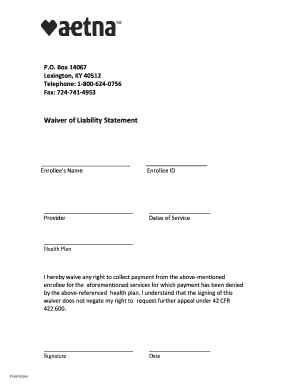
Get Ky Aetna Waiver Of Liability Statement 2019-2026
How it works
-

Open form follow the instructions
-

Easily sign the form with your finger
-

Send filled & signed form or save
How to fill out the KY Aetna Waiver Of Liability Statement online
Completing the KY Aetna Waiver Of Liability Statement online is an important process for those needing to document their agreement regarding payment for services. This guide provides a straightforward approach to ensure that you fill out the form correctly.
Follow the steps to complete the form accurately.
- Click 'Get Form' button to obtain the document and open it in your preferred editor.
- Enter the enrollee's name in the designated field, ensuring accurate spelling as it appears in official documents.
- In the 'Provider' section, input the name of the service provider who has delivered the services to the enrollee.
- Fill in the 'Enrollee ID' field with the enrollee's unique identification number associated with their health plan.
- Input the 'Dates of Service' to specify the period during which the services were provided.
- Select the relevant 'Health Plan' from the dropdown list, identifying the insurance plan responsible for the services.
- Review the waiver statement carefully. This informs the enrollee that by signing, they waive their right to collect payment for the denied services.
- Sign the form by entering your name in the 'Signature' field, confirming your understanding and acceptance of the waiver terms.
- Date the document by entering the current date in the designated area, which marks the completion of the form.
- Once the form is filled out, you can save your changes, download it for your records, or print it out for submission. If necessary, share the document with relevant parties.
Complete your documents online today for a seamless experience!