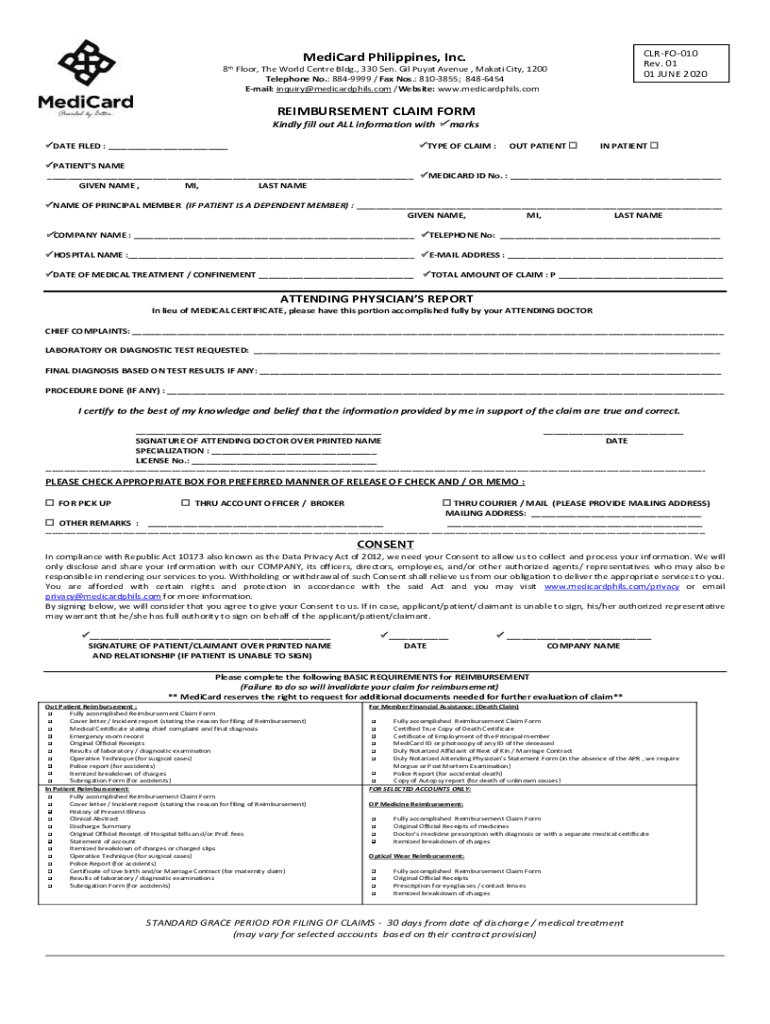
CLRFO010 Rev. 01 01 JUNE 2020MediCard Philippines, Inc. th8 Floor, The World Center Bldg., 330 Sen. Gil Put Avenue, Marathi City, 1200 Telephone No.: 8849999 / Fax Nos.: 8103855; 8486454 Email: inquiry medicardphils.com.
Loading

Open form follow the instructions

Easily sign the form with your finger

Send filled & signed form or save
How to fill out the PH MediCard CLR-FO-010 online
Filling out the PH MediCard CLR-FO-010 reimbursement claim form online is a straightforward process that requires attention to detail. This guide provides step-by-step instructions to help you complete the form accurately and efficiently.
Follow the steps to fill out the PH MediCard CLR-FO-010 form successfully.
- Click ‘Get Form’ button to obtain the form and open it in the online editor.
- Fill in the date filed by providing the current date in the designated field.
- Select the type of claim by marking the appropriate box for either 'Out Patient' or 'In Patient'.
- Enter the patient's name with the format: given name, middle initial, last name.
- Input the MediCard ID number in the specified field.
- If the patient is a dependent member, include the principal member’s name in the same format as the patient's name.
- Provide the company name if applicable.
- Fill in the contact telephone number.
- Enter the hospital name where the treatment occurred.
- Input the email address for correspondence.
- Indicate the date of medical treatment or confinement.
- Fill in the total amount of claim.
- Complete the attending physician's report section, including chief complaints, laboratory tests requested, final diagnosis, and procedures done.
- The attending physician should sign the report, include their specialization and license number.
- Select one of the preferred methods for releasing the check and fill in the mailing address if necessary.
- Complete the consent section by signing and dating, including company name, if applicable.
- Review the document for completeness and accuracy before proceeding.
- Once all fields are filled out, save the changes you have made, and then download, print, or share the form as needed.
Begin completing the PH MediCard CLR-FO-010 form online today.
Experience a faster way to fill out and sign forms on the web. Access the most extensive library of templates available.
Related content
Reference the Medicare Administrative Contractor Address Table for the correct address to...
Documentation is required quarterly. Generally, those who choose to pay premiums by check...
Use professional pre-built templates to fill in and sign documents online faster. Get access to thousands of forms.
If you believe that this page should be taken down, please follow our DMCA take down process here.