Loading
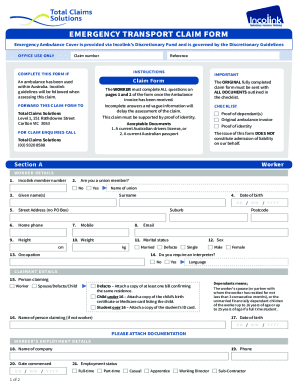
Get Au Total Claims Solutions Emergency Transport Claim Form 2019-2025
How it works
-

Open form follow the instructions
-

Easily sign the form with your finger
-

Send filled & signed form or save
How to fill out the AU Total Claims Solutions Emergency Transport Claim Form online
Filing a claim for emergency transport can be straightforward when you have the proper guidance. This guide will provide you with step-by-step instructions on how to fill out the AU Total Claims Solutions Emergency Transport Claim Form online to ensure your submission is accurate and complete.
Follow the steps to successfully complete your claim form.
- Click ‘Get Form’ button to access the AU Total Claims Solutions Emergency Transport Claim Form and open it in your preferred editor.
- Begin by entering your worker details in Section A. Provide your Incolink member number, name, surname, date of birth, and contact information. Ensure all fields are completed as required.
- Indicate your marital status and occupation, along with the physical measurements of your height and weight. This information is necessary for processing your claim.
- Next, complete the claimant details. If someone else is claiming on your behalf, fill in that individual's information, including their relationship to you and any required documentation.
- Provide your employment details. Include the name of your employer, employment status, and the start date. Confirm your current employment status by answering whether you are still employed.
- In the other benefit details section, indicate if you hold a Pension or Health Care card and if you have private health insurance. Provide your health fund's information if applicable.
- Fill in the ambulance details, including the date and exact time the ambulance was required, and provide a brief description of why the ambulance was needed.
- In the payment details section, choose how you would like to receive any benefits. Ensure you fill out your banking details accurately if opting for direct payment.
- Finally, complete the declaration and authorisation section. Sign and date the form to confirm that all information provided is true and accurate, and that you authorise the release of your information as required.
- Once you have filled out the form completely, review all entries for accuracy. Save your changes, and then proceed to download, print, or share the form as necessary.
Start submitting your claims online today for a smooth and efficient processing experience.
Industry-leading security and compliance
US Legal Forms protects your data by complying with industry-specific security standards.
-
In businnes since 199725+ years providing professional legal documents.
-
Accredited businessGuarantees that a business meets BBB accreditation standards in the US and Canada.
-
Secured by BraintreeValidated Level 1 PCI DSS compliant payment gateway that accepts most major credit and debit card brands from across the globe.