
Open form follow the instructions

Easily sign the form with your finger

Send filled & signed form or save
How to fill out the NOVA Healthcare Administrators Vision Claim Form online
This guide provides clear and comprehensive instructions for completing the NOVA Healthcare Administrators Vision Claim Form online. Follow the steps below to ensure a smooth and successful submission of your vision claim.
Follow the steps to effectively complete the form online.
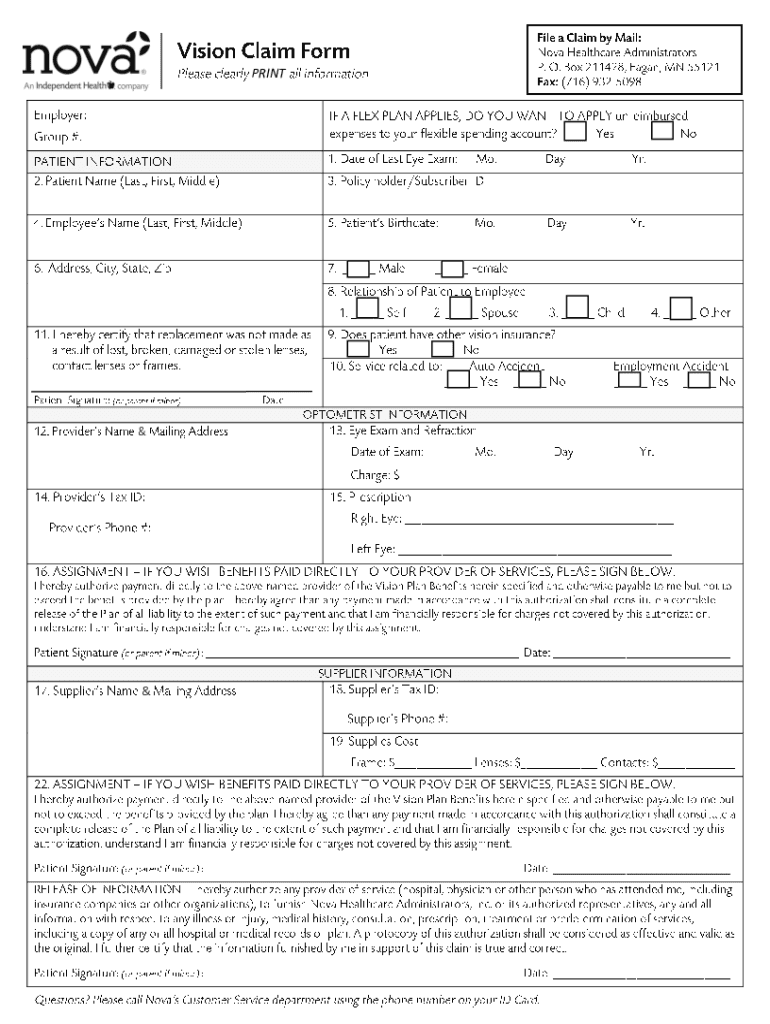
- Click the ‘Get Form’ button to obtain the NOVA Healthcare Administrators Vision Claim Form. This action will allow you to access the necessary document for your claim.
- Carefully read the instructions provided at the top of the form. Understanding these guidelines will help you accurately complete each section and avoid potential delays in processing your claim.
- Fill out the personal information section. Provide accurate details such as your full name, date of birth, and contact information. Ensure that all information is typed clearly to prevent any misunderstandings.
- Complete the section for insurance details. Enter the name of your insurance provider, policy number, and any other relevant information. Double-check to confirm that these details match what is on your insurance card.
- In the claims details section, record the nature of your vision service received. Be specific about the type of treatment or examination and include dates where applicable.
- Attach any necessary documentation, such as invoices or receipts for the vision services. Ensure that these documents are clear and legible, as they will support your claim.
- Review the completed form for accuracy. Check each section to ensure all fields are filled out correctly and that there are no missing pieces of information.
- Once satisfied with your entries, you can save changes to the form. Choose to download a copy, print it for your records, or share it with your healthcare provider as needed.
Complete your NOVA Healthcare Administrators Vision Claim Form online today for efficient processing.
Experience a faster way to fill out and sign forms on the web. Access the most extensive library of templates available.
Related content
This plan's health coverage qualifies as minimum essential coverage and meets the minimum...
File a Claim. • Return completed Healthcare Claim Form with documentation. Mail: Nova...
Jul 1, 2009 — For Medicaid Prepaid Capitation Plans only, the two-digit plan code and up...
Get answers to your most pressing questions about US Legal Forms API.
How do I find my payer ID?
The payer ID is generally five (5) characters but it may be longer. It may also be alpha, numeric or a combination. The payer ID is often located on the back of the insurance card in the Provider or Claims Submission section.
What is the payer ID 16644?
Payer Name: Nova Healthcare Administrators, Inc.
What is the payer ID for Optum EAP?
What Payer ID should I use? A Payer ID is the assigned code that identifies and directs the electronic (EDI) submission of a claim to the correct payer and claim payment system. The Optum payer ID is 87726. A payer ID is not necessary to submit behavioral health or EAP claims on Provider Express or via paper.
What is Nova independent health?
Nova Healthcare Administrators, an Independent Health company, is the administrator of your Reimbursement Account(s) which may include Flexible Spending Accounts (FSA), Health Reimbursement Arrangements (HRA) and Qualified Transportation Accounts (QTA).
What is the payor ID for Beech Street?
Payer Name: Beech Street|Payer ID: 95377|Professional (CMS1500)/Institutional (UB04)[Hospitals]
What is the payer ID 31441?
Payer Name: S & S Healthcare Strategies.
What is the timely filing limit for Nova Healthcare claims?
Claims must be received by Nova five full business days prior to your scheduled reimbursement date.
Use professional pre-built templates to fill in and sign documents online faster. Get access to thousands of forms.
If you believe that this page should be taken down, please follow our DMCA take down process here.